
Artificial intelligence assistants are no longer confined to desktops or bloated enterprise tools. In recent years, the real battleground has shifted to smartphones, where speed, clarity, and low friction matter more than endless features. Microsoft Copilot Mico enters this landscape with a clear proposition: deliver practical AI support without draining battery, patience, or attention span.
Rather than positioning itself as another everything-at-once assistant, Microsoft Copilot Mico focuses on fast interactions. It is designed for users who need answers, summaries, and organization in seconds, not minutes. For freelancers, students, and entrepreneurs constantly switching contexts, this lightweight approach turns out to be more strategic than it sounds.
- Microsoft Copilot: The Smartest Way to Take Notes
- Comment renforcer la sécurité avec Microsoft Authenticator
- How to Get Free Microsoft Certifications
Microsoft Copilot Mico: Microsoft’s smartest lightweight assistant
Microsoft Copilot Mico is an experimental, streamlined version of Copilot developed under Microsoft’s Labs initiative.
To quote Microsoft’s official experiments page, Mico was built to explore human-centered AI interactions on mobile devices, prioritizing responsiveness over complexity.
Unlike the full Copilot experience embedded in Windows or Microsoft 365, Mico strips the interface down to essentials.
The goal is not to replace advanced workflows but to support quick cognitive tasks such as drafting short texts, clarifying concepts, or organizing thoughts on the go.
This design philosophy aligns with Microsoft’s broader AI vision outlined in its 2025 human-centered AI blog post, which emphasizes usefulness over spectacle.
In practical terms, Microsoft Copilot Mico behaves less like a chatbot and more like a digital notepad that thinks faster than you do.
Step-by-step: use Mico for text, search, and organization
Getting started with Microsoft Copilot Mico is deliberately simple. Once installed, the assistant opens directly into a clean prompt interface, optimized for short-form input. Common use cases include:
- Writing quick notes during meetings or lectures;
- Summarizing articles, emails, or study materials;
- Answering factual questions without opening multiple tabs;
- Structuring to-do lists or brainstorming outlines.
The workflow typically follows three steps. First, the user inputs a short request. Second, Mico processes the task using Copilot’s underlying AI models. Third, the output appears almost instantly, optimized for mobile readability.
Because Mico is connected to the broader Copilot ecosystem, it benefits from Microsoft’s ongoing model updates without requiring heavy local processing.
This cloud-based efficiency explains why response times remain consistently fast, even on mid-range smartphones.
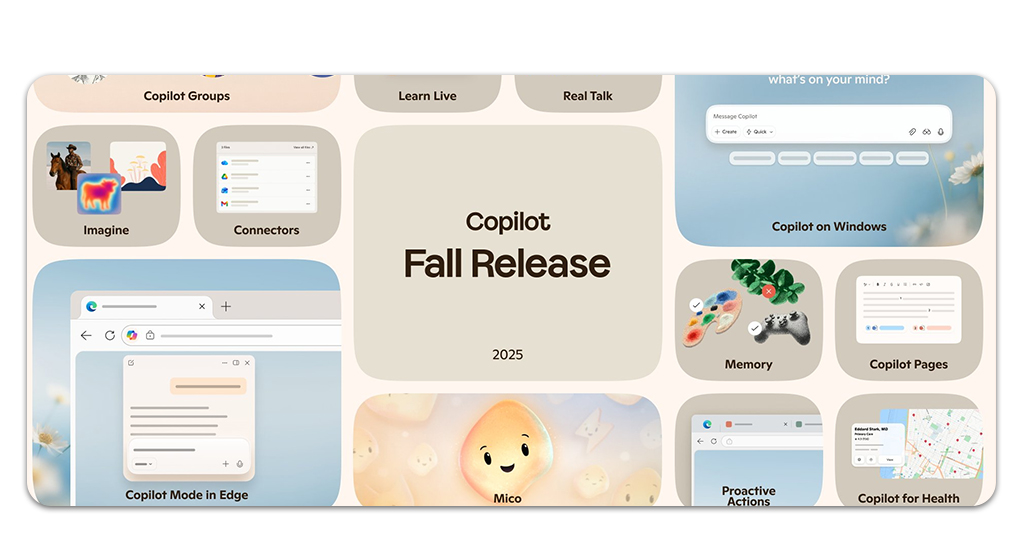
Features that simplify daily tasks
Microsoft Copilot Mico does not compete on volume of features. Instead, it focuses on precision tools that reduce friction in everyday digital routines. Key capabilities include:
Instant text generation for messages, notes, and short documents;
Mico excels at producing concise, purpose-driven text. Whether drafting a professional reply, outlining a paragraph, or capturing a fleeting idea, the assistant prioritizes clarity and tone alignment.
This is particularly useful for users who need presentable writing without opening a full document editor or switching apps.
Fast summarization of long content into actionable insights;
Long articles, reports, or study materials can be reduced to their essential points within seconds.
Instead of generic abstracts, Mico focuses on extracting decisions, next steps, and key arguments, which aligns well with mobile-first consumption habits where scanning beats deep reading.
Context-aware answers for general knowledge and productivity questions;
Mico interprets intent rather than relying solely on keywords. Questions like “turn this into a checklist” or “explain this simply” trigger structured outputs tailored to the task, making it useful not just for information retrieval but for cognitive organization.
Minimalist interface designed for one-handed use on mobile;
The interface avoids visual overload, favoring clean typography and intuitive spacing. This design choice reflects real-world usage scenarios, such as commuting or multitasking, where interaction speed matters more than customization depth.
Low resource consumption compared to full-scale AI assistants;
By offloading heavy processing to the cloud and limiting on-device demands, Mico maintains responsiveness without draining battery or slowing down the system.
This efficiency makes it suitable for extended daily use, even on older or mid-range smartphones.
Microsoft intentionally avoided nostalgia-driven design elements and instead prioritized functional clarity. This choice positions Mico as a serious productivity companion rather than a novelty feature.
For users already familiar with digital productivity tools such as Brain Max, Mico feels like a complementary layer rather than a replacement. It fills the gap between passive note-taking apps and complex AI workspaces.
Where to download Microsoft Copilot
Microsoft Copilot Mico is available through official Microsoft channels and supported app stores. The web version can be accessed at Copilot’s official page, where users can explore Copilot features and experimental tools.
For mobile access, Microsoft Copilot is available on both major platforms: Android users can download it from Play Store and iOS users can install it via App Store.
While Mico itself is labeled as an experimental experience within Copilot Labs, installation does not require special permissions or beta enrollment. Availability may vary slightly depending on region and account configuration.

4.7/5
Why Microsoft Copilot Mico makes sense for mobile-first users
Mobile productivity is often misunderstood. Many tools attempt to replicate desktop complexity on smaller screens, resulting in cluttered interfaces and slow interactions.
Microsoft Copilot Mico takes the opposite approach by acknowledging mobile limitations and designing around them. This strategy reflects real usage patterns.
Data from Microsoft’s internal research, referenced in its Labs documentation, shows that most mobile AI interactions last under one minute.
Mico is optimized precisely for this window, delivering high-value output before attention drifts elsewhere.
For freelancers juggling clients, students managing coursework, or entrepreneurs sketching ideas between meetings, Microsoft Copilot Mico acts as a cognitive shortcut.
It reduces the distance between question and answer, thought and structure.
Practical takeaway for work and study
Meet Mico — your portable Copilot for smarter work and study. Microsoft Copilot Mico is not trying to be the most powerful AI assistant on the market. Its value lies in restraint.
By focusing on speed, clarity, and mobility, it addresses a real gap in the AI ecosystem.
Download Copilot Mico and make your phone truly smart.
Use AI assistance anywhere — lighter, faster, and free.