The way we interact with the internet is undergoing its biggest transformation since the invention of the search engine. For decades, we were trained to think in keywords—typing “best weather Tokyo October” and sifting through a “wall of blue links”. Today, the real obstacle in gathering information is time. We no longer want a list of websites to sort through. We want a clear, direct answer.
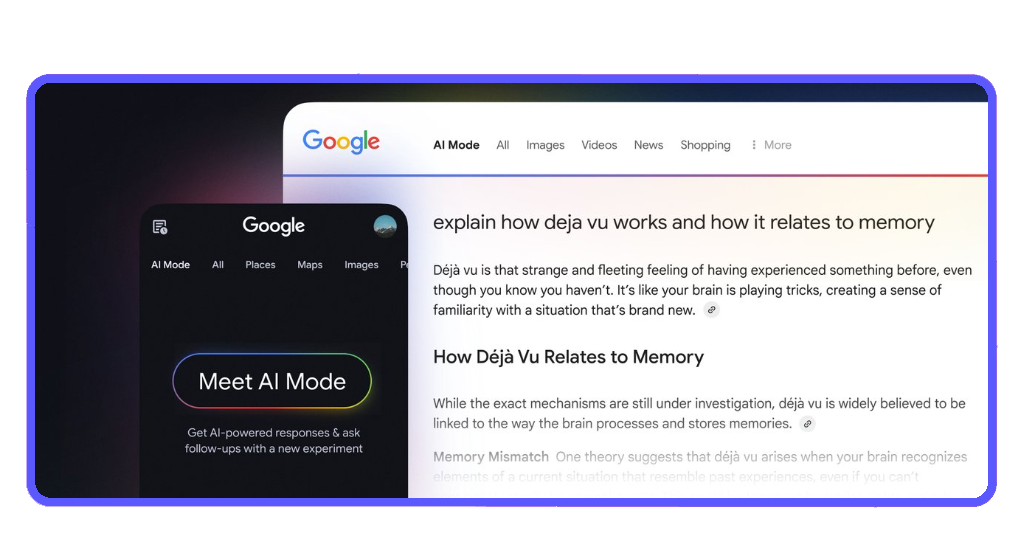
Google AI Mode represents this paradigm shift. Powered by the Gemini engine, it transforms Google from a librarian into a research assistant. Originally, it gave you a map of where information lives. Now, it reads, synthesizes, and explains the topic to you in plain English. Whether you are planning an itinerary or studying quantum physics, AI Mode does the heavy lifting so you can focus on the insights.

4.3/5
Search is changing — here’s how to use it to your advantage
The traditional search experience is undergoing a fundamental restructuring, moving away from a list of indexed links toward a conversational, generative interface.
Historically, users facing multi-layered queries were required to execute several distinct searches—a process known as “search chaining”—and manually aggregate the findings.
Google AI Mode automates this synthesis by utilizing Large Language Models (LLMs) to scan and consolidate information into a single, cohesive response positioned at the top of the Search Engine Results Page (SERP).
The official Google app is available for Android und iOS, and its transition represents a significant change in information retrieval metrics.
Unlike traditional snippets that offer a preview of a single page, AI Mode provides a multi-source summary equipped with direct citations.
This AI-assisted approach drastically reduces “interaction cost”—the sum of mental and physical efforts users must exert to reach their goals.
By presenting a high-level “bird’s eye view” that cites various domains, the system allows for the absorption of complex data with substantially less cognitive load than conventional browsing.
Google AI Mode: break down complex questions easily
The true power of Google AI lies in its ability to handle “N-dimensional” queries. These are questions that have multiple layers and constraints.
- The planning power: instead of searching “hotels in Paris” and then “best bakeries in Paris”, you can ask: “Plan a 3-day trip to Paris for a family of four that loves history but hates long lines, including budget-friendly dining near the Louvre”;
- The comparison engine: you can ask Google to compare products across different dimensions instantly. “What are the pros and cons of a heat pump vs. a gas furnace for a 2,000 sq ft home in a cold climate?”;
- Synthesis of ideas: for students and professionals, AI Mode can summarize long-form academic debates or news cycles, providing a balanced view of “Why is this happening?” rather than just “What happened?”
- Android kämpft zurück: Präsentiert Google-Betrugs-Tool
- Android Hacks: How to Switch From Google Assistant to Gemini AI
- Best AI Search Engines to Try Instead of Google
Ask by typing, talking or snapping photos
Search is no longer confined to a text box. Google AI is multimodal, meaning it understands the world through text, voice, and vision simultaneously:
- Type: traditional input, but now with natural language. You don’t need “search-ese”; just talk to it;
- Talk: using Gemini Live technology, you can have a back-and-forth conversation to refine your results in real-time;
- Snap (Google Lens): this is perhaps the most transformative feature. See a plant you don’t recognize? Snap a photo. Broken part on your bike? Point your camera and ask, “How do I fix this?”. The AI identifies the object and fetches the specific repair manual or video tutorial instantly.
When to trust AI results — and when to double-check
While Google AI is a massive leap forward, it is not infallible.
Large Language Models (LLMs) can occasionally “hallucinate” or present outdated information as current. To use this tool safely in 2026, follow these “Trust-but-Verify” rules:
- Check the citations: Google AI Mode includes “Source Cards”. Always click through to the original website for high-stakes information;
- The “YMYL” rule: for questions regarding Your Money or Your Life (health, finance, legal), treat the AI result as a starting point only. Consult verified professional sources;
- Cross-reference news: for breaking events, use the “News” filter alongside the AI overview to see real-time reporting from different journalistic outlets.
Tricks to get better answers every time
To get the most out of Google AI, you need to move beyond basic prompts:
- Use follow-up questions: after the first result, tap “Ask a follow-up”. You can say, “Make that plan cheaper” oder “Explain that to me like I’m five”;
- Set constraints: give the AI a persona or a limit. “Summarize this article in 3 bullet points for a busy executive”;
- Combine with traditional filters: use the AI to understand the concept, then use the “Maps” or “Shopping” filters to take action. This hybrid approach is how pro-users navigate the web.
4.3/5
Step into the future of information
Search is evolving, for sure.
Google AI Mode is a new way of thinking, not just a new feature. In a fraction of the time, you can reach deeper levels of knowledge by switching from “Searching” to “Interacting”.
If you want to dive deeper into the tech behind this, check out our guide onGemini Nano, the “on-device” AI that makes these fast results possible.