
The normal thing is having changes in vision happen gradually, and that’s the main reason why it makes them easy to ignore, until the very moment they begin to interfere with daily tasks like reading, playing video games, driving, or using a phone screen. Still, when people notice small signs such as eye strain, blurred text, or difficulty focusing at night; they delay taking action because scheduling an appointment can take time and planning.
That is the moment when an app designed to estimate your eyeglass prescription can be useful as a first step. Smart Optometry (iOS/Android), for example, is an app that helps users to perform visual tests at home, offering a quick way to check clarity and identify possible changes. While the app doesn’t replace a full professional exam, it still provides a reference that helps users understand when further evaluation may be necessary.
- Blurry Vision After Work? Try This Online Eye Exam App
- How To Fix Closed Eyes in Photos With Free AI Tools
- ShutEye App – Sleep Tracking for Better Health
Which app can tell you your eyeglass prescription?
If you’re in search of an app that can estimate your eyeglass prescription, the first required thing to know is understanding what these apps are actually designed to do.
To answer that question, we can say they don’t provide an official prescription in the same way an eye doctor would.
However, they can measure visual acuity and indicate whether there may be a need for corrective lenses.
In this post, Insiderbits will uncover Smart Optometry (iOS/Android), an app that stands out because it uses visual tests similar to those found in clinical environments.
The app adapts these visual tests to a format that can be performed at home, making it possible to evaluate how clearly you can see and identify potential vision issues.
Moreover, being able to run a quick test without scheduling an appointment lets users monitor changes more frequently.

4.4/5
Features available in the Smart Optometry
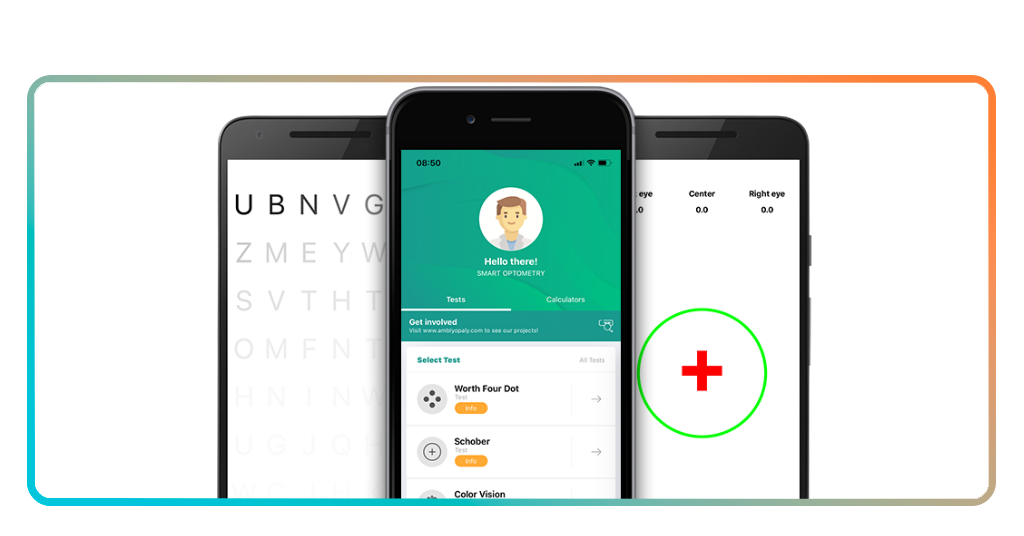
The features inside Smart Optometry (iOS/Android) are designed to simulate common vision assessments in a way that can be performed outside a clinical setting.
The first feature we highlight is the visual acuity test that measures how clearly a person can see letters or symbols at specific distances.
The app also includes contrast and perception tests, which go beyond simple clarity and evaluate how well the eyes distinguish shapes and details under different conditions.
Another relevant aspect involves repeatability, where users can perform the test multiple times over a period.
Overall, these features create a nice app for monitoring vision, offering guidance that can support more informed decisions about eye care.
Step-by-step: how to check your vision using the app
Insiderbits prepared the tutorial below so you can follow the process carefully and without rushing:
Step 1: set up your environment
To begin with, download Smart Optometry on the App-Store or the Play Store and position yourself in a well-lit space where the screen can be viewed clearly without glare.
Step 2: follow the test instructions precisely
Then, read the guidelines provided by the app, including recommended distance from the screen and positioning, before starting the test.
Step 3: complete the visual tests step by step
Go through each section carefully, responding to what you see without guessing, so the results reflect your actual perception.
Step 4: review your results and take note of changes
Check the outcome and compare it with previous tests, if available, to understand if your vision has shifted.
Step 5: use the results as a reference, not a diagnosis
Treat the result as an indicator and consider professional evaluation if the app suggests reduced visual clarity.
Tips for accurate results
Apps to estimate your eyeglass prescription can be useful, though accuracy depends heavily on how the test is performed.
That’s because unlike a clinical environment, where conditions are controlled, at-home testing relies on the user to create a suitable setup and follow instructions carefully.
Since lighting is one of the most important factors, a space that is too dark or too bright can affect how clearly symbols appear on the screen, which may influence the results.
To avoid that, keep the lighting balanced to ensure that what you see reflects your actual vision rather than external conditions.
Also, distance from the screen also plays a critical role, and visual acuity tests are calibrated for a specific viewing distance, and small deviations can change how symbols are perceived.
So taking a moment to measure or approximate the correct distance when using Smart Optometry (iOS/Android) improves the reliability of the test.
Ultimately, repeating the test under similar conditions can help confirm whether the results are stable.
How to find the perfect glasses for you
Once you have a better understanding of your eyeglass prescription, the next step involves choosing lenses and frames that match both your needs and your daily routine.
Some people don’t know, but vision correction is not just about clarity, but about comfort and how well the glasses adapt to different situations as well.
Frame selection plays an important role in how glasses feel and look. Remember trying different options or using virtual tools can make this process easier and more intuitive.
Lens type also matters, since different lifestyles may require specific features such as blue light filtering, anti-reflective coating, or lenses designed for extended screen use.
Understanding these options helps create a more tailored solution.
Combining the right prescription with suitable frames and lenses leads to a more comfortable and effective visual experience.
4.4/5
From quick checks to better vision awareness
You’ve just learned that what begins as a simple check can turn into a way of noticing patterns and understanding when your current lenses may no longer be sufficient.
This kind of awareness helps avoid long periods of adaptation to reduced vision.
At the same time, the app works best when seen as a starting point, though professional evaluation remains essential for a complete diagnosis and accurate prescription.
With regular use and proper expectations, the result is an informed approach to eye care, where decisions are based on observation and consistency.
Verwandt: Blurry Vision? Take This Free Eye Test for Instant Results
Enjoyed this article? Save Insiderwissen to your favorites and discover the most useful tech tips.