

Hours go into creating content, growing a following and putting work out into the world. Then someone clicks the link in your social media bio and lands somewhere that shows maybe a fraction of everything going on. It’s a frustrating gap between what you have to offer and what followers actually find. Linktree turns one single link into a full destination where everything you do lives in a single spot.
Diese Insiderwissen guide breaks down everything worth knowing about the app so you can hit the ground running. From how Linktree works to setting up your page and making the most of your profile, we have you covered. Keep reading and find out how one free link in your bio can become the most powerful tool in your entire online presence.
Verwandt: How to go viral on social media: tips and tools that actually work
Learn how this app works for creating social media bio
Linktree (Android | iOS) gives you one link that holds everything your followers need to find. No more choosing between your store, your latest post, or your newest project.
Your social media bio has limited real estate, and Linktree makes every character count by turning that single link into a fully loaded personal landing page.
Setting up takes only a few minutes. You pick a username, add your links, tweak the design and share it across every platform where your audience finds you.

4.8/5
Features available in the Linktree app
- Custom design tools: full control over colors, fonts, button styles and background images so your page feels like an extension of your brand;
- Link variety: add products, videos, playlists, podcasts, menus, causes and social profiles all in one place for followers to explore;
- Analytics dashboard: see exactly what your audience clicks, where they come from and how your page performs so you can make informed decisions;
- Monetization options: collect tips, sell products, and promote paid content directly from your page without sending followers to a separate platform.
Reach your audience across every platform
Your social media bio on Linktree works the same whether followers find you on Instagram, TikTok, YouTube, or anywhere else you post your content.
Adding your Linktree link to every platform means followers always land in the same place, no matter where they discovered you or what they were looking for.
You also get a personal QR code that works on business cards, menus, and printed materials, extending your reach far beyond what a screen alone covers.
Turn your bio into a revenue stream
Linktree does not limit you to sharing links. You can collect tips, promote products, and point followers directly to paid content from one single page.
Every creator has something worth offering, and your social media bio is often the first place a follower decides to go deeper into what you do.
Setting up a store or a tip jar is as simple as adding any other link. Followers see it the moment they land on your page and can act on it immediately.

Step-by-step: how to create your landing page using the app
Getting your Linktree (Android | iOS) page up and running is something you can knock out on your lunch break. The whole process lives inside the app from start to finish.
Once your social media bio has a Linktree link attached to it, followers stop bouncing between platforms looking for what you do. Everything lands in one organized spot.
From downloading the app to sharing your finished page, each part builds on the last. By the end, your online presence has a home that truly represents you.
Step 1: download Linktree on your phone
Gehen Sie zum App-Store oder Google Play on your phone and search for “Linktree”. The app is free to download, and your account setup happens right inside it without any extra steps.
Once you’re in, you’ll create a username that becomes your personal URL. Keep it close to your name or handle so followers recognize it the moment they see it.
After picking your username, the app walks you through the basics. You’ll have a working page ready to populate with links before you even put your phone down.
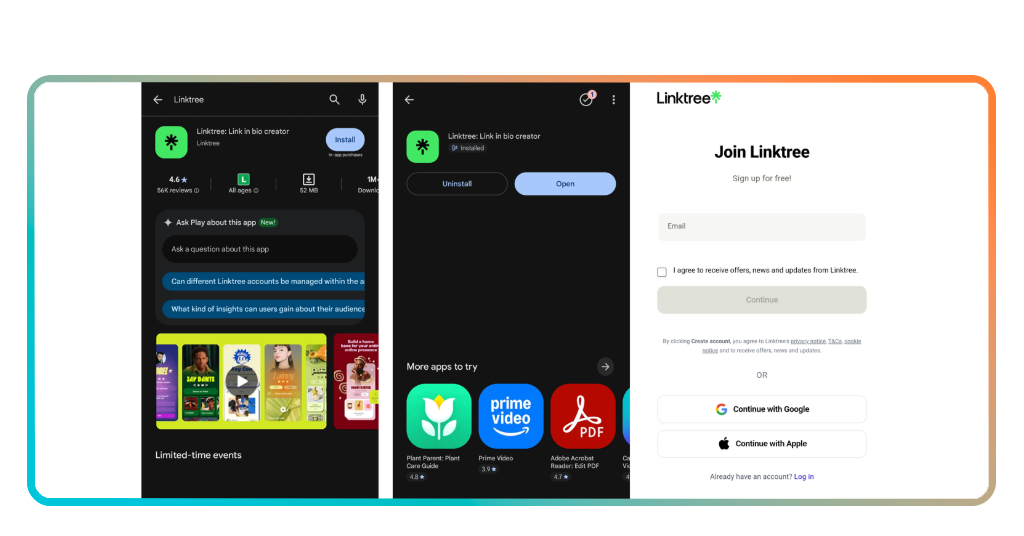
Step 2: build and personalize your page
Your social media bio link is only as strong as the page behind it, and this is where Linktree gives you full control over what followers see when they arrive.
Add links to everything worth sharing, your store, your content, your profiles, and anything else your audience would want to explore after discovering you somewhere online.
From there, you adjust colors, fonts, and button styles to match your brand. You can upload a custom background or pick from a library of pre-made themes to get going.
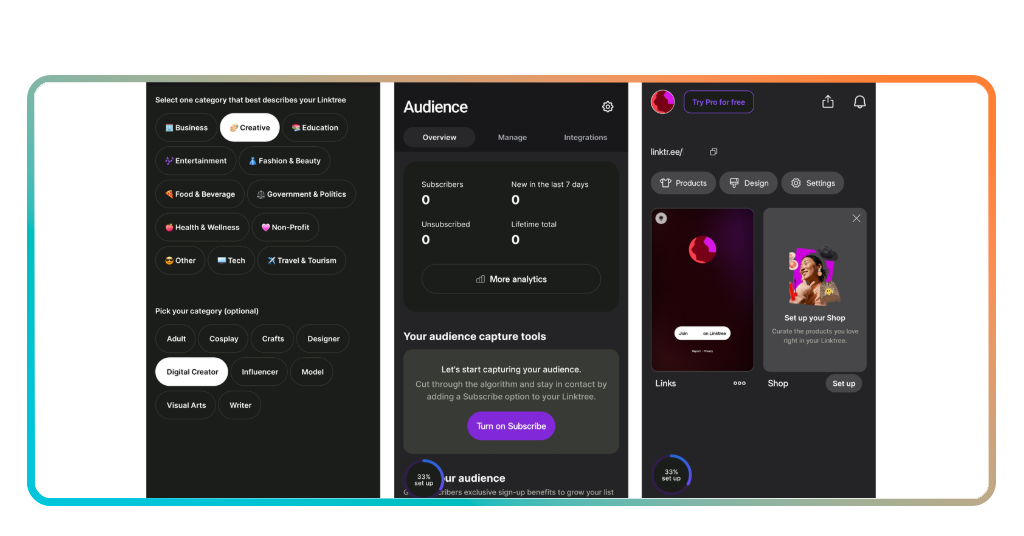
Step 3: share your Linktree everywhere
Your page is live and ready, so the next move is putting that link in front of as many eyes as possible across every platform you use to post content.
Drop it into your social media bio on Instagram, TikTok, YouTube, Twitter, and anywhere else your audience follows you. One link covers every platform at the same time.
You also get a QR code that works offline. Print it on a business card, a flyer, or a menu and give people a way to find you beyond the screen.
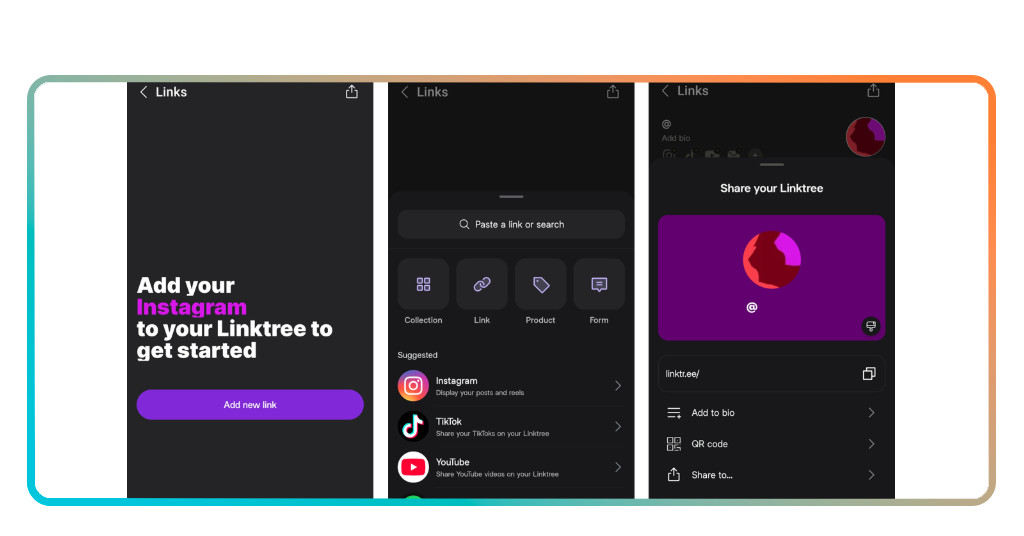
Verwandt: Social Media Scheduling: Manage All Platforms from One App
Tips for optimizing your profile
Having a Linktree page is one thing. Getting it to pull real results for your growth is a different conversation that comes down to a few key decisions.
The way you organize and present your page tells visitors exactly what to do next. A cluttered or mismatched profile loses people before they even click on anything.
Small changes add up over time, and the creators getting the most out of their social media bio are the ones who treat their Linktree page as a living document.
Keep your most important links at the top
Visitors spend very little time scanning your page before deciding where to go. Whatever you want them to click first needs to be the first thing their eyes land on.
If you just dropped new content, launched a product, or opened up bookings, that link goes to the top. Your page order should reflect what is happening in your world right now.
Revisit your link order every time something changes in your content or business. A page that reflects your current priorities keeps followers engaged and clicking on the right things.
Match your Linktree to your brand style
A good social media bio link leads to a page that feels like a natural extension of who you are, and Linktree gives you the tools to pull that off.
Use the same colors, fonts, and visual language you already use across your content. When someone lands on your page, it should feel like they never left your Instagram or TikTok.
Uploading a custom background image or video takes it a step further. Even small visual details signal to followers that your page was put together with intention and care.
Track your analytics and adjust accordingly
Linktree shows you which links get clicked, where your visitors come from and how your page performs over time. That information is worth paying attention to on a regular basis.
If a link is sitting at the top of your page and nobody is tapping it, that is useful feedback. Move it, reword it or replace it with something your audience responds to.
Your social media bio sends people somewhere, and the analytics tell you what happens after that click. Use that data to keep improving what your page offers to every visitor.

Best links you should add to your Linktree
Not every link deserves a spot on your Linktree (Android | iOS) page. The ones you choose tell visitors exactly what you are about and where you want them to go next.
Think about what your audience actually looks for after discovering you. A cooking creator might need a recipe blog link. A fitness coach might need a booking page front and center.
Curating your links with intention is what separates a page that converts from one that gets ignored. That is the real power behind a well-built social media bio link.
Your most active social media profiles
Start with the platforms where you post the most. If your TikTok gets daily uploads and your YouTube channel drops weekly videos, those two deserve the top spots on your page.
Linking to a platform you barely use sends followers to a dead end. Stick to the profiles where you show up consistently and where new visitors will find fresh content waiting.
If you are active on Pinterest oder Twitch, add those too. The goal is giving every type of follower a way to connect with you on the platform they already use.
Products, services, and exclusive content
Your social media bio is where followers decide if they want to go deeper with you, and a link to your shop or service page gives them an immediate way to do that.
If you sell digital products like presets, templates, or e-books, link directly to the product page. Sending people to a homepage makes them work harder than they need to.
Add a link to your newsletter or membership community if you have one. Exclusive content links tend to perform well because followers who click them are already invested in what you do.
Community causes and personal projects
Linktree is not only about selling or growing follower counts. It is also a space to share what you care about and invite your audience into something bigger than your content.
If you support a nonprofit, volunteer with a local organization or raise funds for a cause, adding that link shows followers a more complete picture of who you are beyond the posts.
A passion project like a zine or a community group deserves a spot on your social media bio too. It gives followers another entry point into your world and keeps them coming back.
4.8/5
Verwandt: TikTok’s Creator Monetization: How to Earn Real Money
One link to rule your entire online presence
Linktree takes everything you create and puts it somewhere followers can find it. One link, one page, and zero chance of losing someone between platforms.
Diese Insiderwissen guide walked you through how updating your social media bio with Linktree can grow your audience, drive sales, and keep followers connected to everything you do.
Explore other Insiderwissen articles and pick up more social media hacks that help you show up stronger online. Good things happen when you know which tools are worth your time.




