

You sit down to work, and within five minutes you’ve checked three apps, answered a text, and somehow ended up scrolling through things you don’t need. Your brain bounces between tasks like a bad internet connection. Focus Keeper is a pomodoro timer app that claims it can pull you back from the chaos and help you actually finish what you started.
This is an Insiderwissen article showing you how this focus tool trains your brain to work in concentrated bursts instead of scattered attempts. You’ll learn the exact steps to use Focus Keeper, features that block out distractions, and tips to double your output without burning out. If you want to stop feeling like your attention is held together with duct tape, keep reading.
Verwandt: Master Multitasking: Use Two Apps at Once for Free

4.8/5
Learn a better way to focus with a pomodoro timer app
Focus Keeper (Android | iOS) runs on a simple idea: work for 25 minutes, rest for five, repeat. The app automates the cycle so you don’t have to watch the clock or remember when to stop.
Your attention fades after a certain point, and pretending otherwise just wastes time. Instead of letting you spiral into exhaustion, Focus Keeper pulls you out before your brain turns to static.
You pick a task, hit start, and the timer takes over. No complicated setup or habit-tracking nonsense. This pomodoro timer app runs quietly and nudges you when it’s time to move on.
Features available in the Focus Keeper app
- Customizable intervals: adjust work sessions, short breaks, and long breaks to fit your rhythm instead of forcing yourself into a one-size-fits-all schedule that feels wrong;
- Task tracker: log what you’re tackling during each session so you actually know where your time went instead of ending the day with nothing to show for it;
- Progress analytics: view charts that display completed sessions over days and weeks, giving you real proof that you’re building momentum instead of relying on vague hope;
- ADHD-friendly design: built for people who fight inconsistent attention, offering structure that feels helpful instead of adding layers of complexity you’ll abandon.
Break free from constant distractions
Distractions arrive without warning. A notification pops, a random thought derails you, or you need to check something that doesn’t matter. This pomodoro timer app shuts that loop down.
When the timer runs, you have one task. Everything else waits for the break. Your brain stops treating every impulse like an emergency that needs handling this second.
After a few rounds, reaching for your phone mid-session feels less automatic. You realize distractions aren’t urgent, and waiting five minutes won’t ruin anything.
Work smarter with timed intervals
Timed intervals prevent you from burning out on tasks that feel endless. Instead of staring at a screen for three hours producing nothing, you work in bursts that create progress.
The structure handles decisions for you. You don’t waste mental energy figuring out when to start or quit. The pomodoro timer app decides, and you follow without thinking about it.
Breaks are built into the system, keeping your brain from melting halfway through the afternoon. You finish sessions tired but functional, not completely useless for what comes next.
Step-by-step: how to finish work 2x faster using the Focus Keeper
Getting started takes less than five minutes. You download Focus Keeper (Android | iOS), set your first session, and let it run while you work on one thing at a time.
The speed comes from eliminating wasted motion. Instead of bouncing between tasks and losing your place, the pomodoro timer app locks you into single-focus mode until the timer ends.
After a few cycles, you’ll notice how much you finish compared to your old method. The difference isn’t magic. It’s just removing all the junk that kills your output.
Schritt 1: Lade die App auf dein Handy herunter
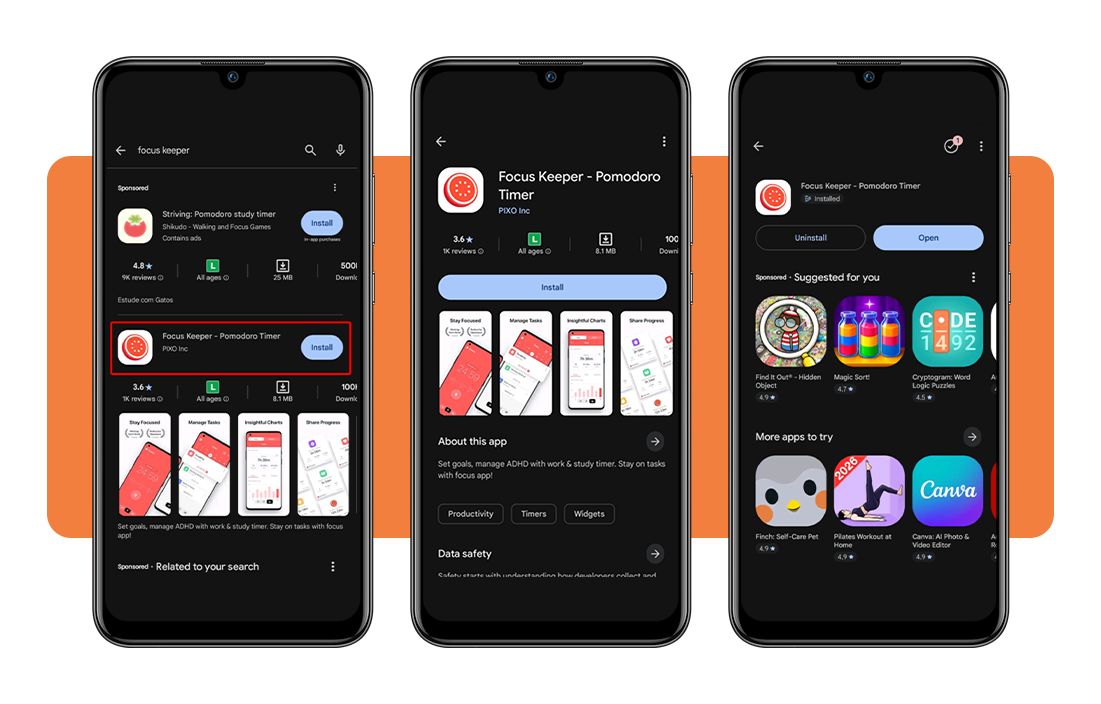
Focus Keeper lives in the App-Store und Google Play. Search for it, hit download, and wait about five seconds. The app takes up some space, especially on iOS, so make sure you have it.
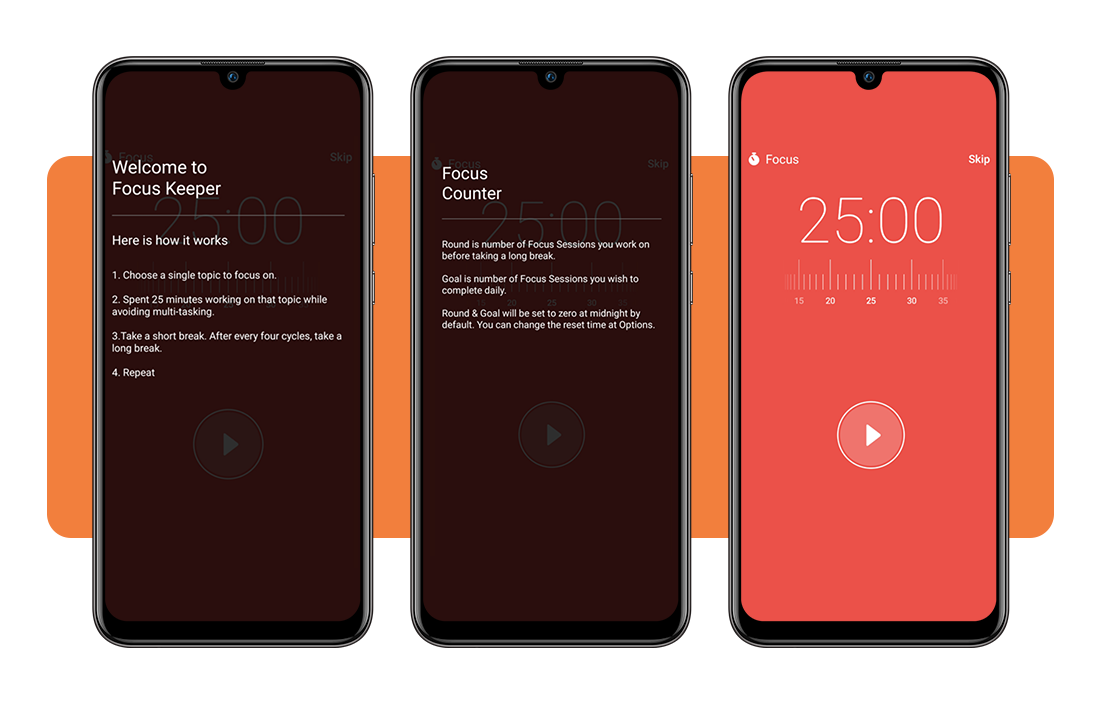
Open it once to get past the welcome screen. The interface shows a big timer in the center, a start button, and a few settings you’ll tweak later if needed.
No account required. No emails to verify. You’re not signing up for a newsletter or handing over personal information. The app just sits there waiting for you to use it.
Step 2: set your first focus session
Tap the settings icon and decide how long you want to work. The default is 25 minutes, but you can adjust it if that feels too long or too short.
Pick one task before you start the timer. Don’t try to multitask or keep options open. The pomodoro timer app works when you commit to a single thing and ignore everything else.
Hit start and put your phone face down. The timer runs in the background, so you don’t need to stare at it. You’ll hear a notification when the session ends.
Step 3: complete cycles and track progress
Finish the first session, take your five-minute break, then start another one. After four rounds, the app gives you a longer break to recharge before the next set begins.
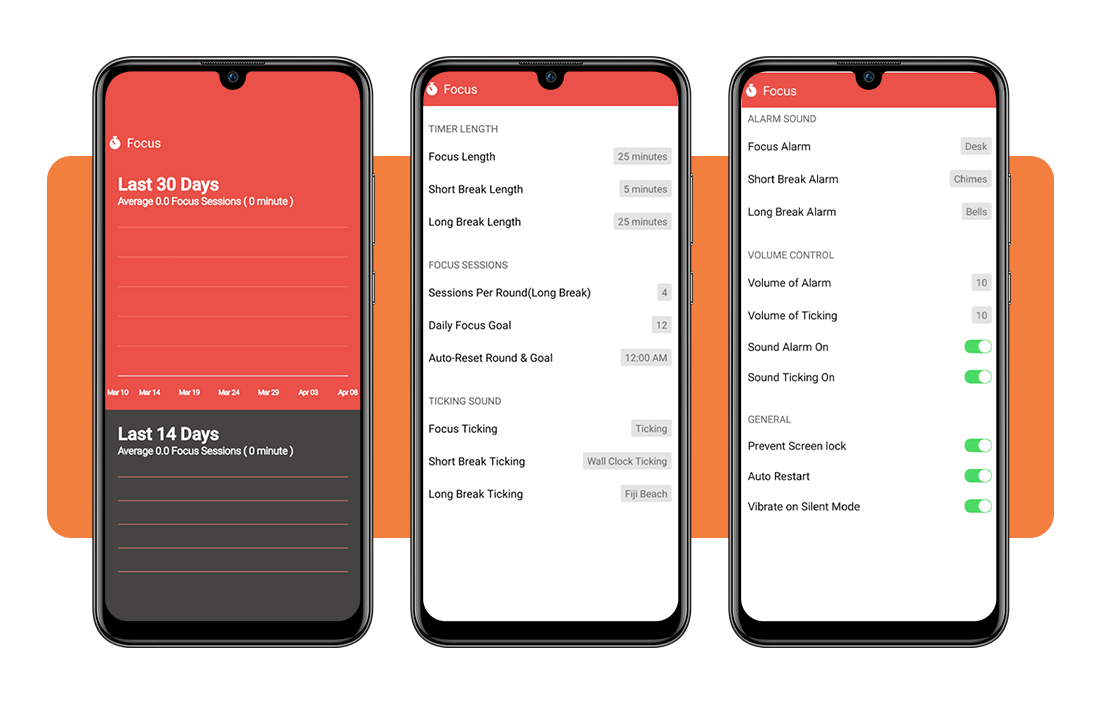
Each completed session gets logged in the app’s progress section. You’ll see how many cycles you finished that day, that week, and over time as the numbers stack up.
The data shows you patterns. You’ll notice which hours you’re productive and which ones you waste, so use the pomodoro timer app to schedule hard work during your peak windows.
Verwandt: Check your attention span and find out if your focus is compromised
Tips to maximize your productivity and focus
The app does half the work, but you need to handle the other half. Small changes to how you set up your sessions make a huge difference in output.
Most people sabotage themselves without realizing it. They leave notifications on or try to juggle tasks. The pomodoro timer app only works if you’re willing to remove those obstacles.
These tips take seconds to implement and triple the value you get from each session. They’re not complicated. You just need to stop fighting your own brain and work with it.
Eliminate notifications during focus sessions
Turn on “Do Not Disturb” before you start the timer. Notifications kill focus instantly, and even glancing at your phone derails you for several minutes after the interruption passes.
Silent mode isn’t enough. Seeing the screen light up triggers the same brain response as reading the message, so you need a total blackout where nothing pops up or vibrates.
Most phones let you schedule Do Not Disturb automatically. Set it to activate during your work hours so you don’t forget, and it’s one less decision to make every session.
Choose one task per interval
Switching between tasks burns energy and produces worse results than focusing on one thing until the timer runs out. The pomodoro timer app forces single-task mode.
Pick the task before you hit start and write it down if you need to. When random thoughts about other work pop up, ignore them until the break comes around.
If the task takes longer than one interval, break it into chunks. Finish chunk one, take your break, then move to chunk two. Progress stacks without the chaos of jumping around.
Adjust timers to match your rhythm
The 25-minute default works for some people and feels wrong for others. If you hit your stride around minute 20 and the timer cuts you off, extend the interval to 30 or 35.
Deep work like writing or coding benefits from 45-minute blocks. Quick tasks like emails or admin work fit better into 15-minute sprints without feeling stretched thin.
Experiment with different lengths until you find what clicks. This pomodoro timer app lets you customize everything, so use that flexibility instead of forcing yourself into a structure that drains you.

Benefits of using Focus Keeper daily
Using Focus Keeper (Android | iOS) once won’t change anything. The real value shows up after weeks of consistent sessions when your brain rewires itself to focus on command.
You stop relying on willpower to get things done. The pomodoro timer app builds a framework that handles motivation for you, turning productive work into a reflex instead of a battle.
The benefits compound over time. You finish more, feel less drained, and gain actual data on how you work instead of guessing what makes you productive or what tanks your output.
Build consistent work habits over time
Habits form through repetition. Every session you complete teaches your brain that sitting down and working for 25 minutes is normal, not some heroic act requiring perfect conditions.
The timer removes the friction of starting. You don’t need to feel motivated or wait for the right mood. You just hit start, and your brain follows the pattern it’s learned.
After a few weeks, sitting down to work feels automatic. You skip the internal negotiation about whether you’re ready or focused enough. You just do it and let the results speak.
Reduce burnout with structured breaks
Burnout sneaks in when you push through exhaustion. You think you’re being productive, but you’re just staring at the screen making mistakes. The pomodoro timer app stops that cycle.
Breaks aren’t rewards for good work, they’re maintenance. Your brain needs them to process information and keep functioning without turning every task into a slog that drains you for hours.
Forcing yourself to stop feels counterintuitive at first. You want to keep going when you’re in the zone. But taking the break anyway prevents the crash that ruins the rest of your day.
Gain insights from your productivity data
The app tracks every session you complete and turns it into charts showing when you work, how long you focus, and where your productivity peaks or drops off completely.
The data shows you’re useless after lunch or that mornings give you three hours of solid output before your brain quits. You plan around reality instead of hope.
Patterns emerge after tracking for a few weeks. This pomodoro timer app gives you proof about which days you skip sessions, which tasks drag on, and where time disappears.
Verwandt: Stop procrastinating: download this free focus booster app
4.8/5
Transform your workday in 25 minutes
Focus Keeper won’t fix every productivity problem you have, but it handles the big one: actually sitting down and working without your brain exploding into a thousand distractions mid-task.
Dieser Leitfaden von Insiderwissen showed you how this pomodoro timer app breaks work into smaller chunks, forces breaks before burnout, and tracks your progress so you start being productive.
Stay with Insiderwissen for more articles on productivity apps that help you get things done without turning work into a mental wrestling match that leaves you exhausted and behind schedule.




