Blurry photos are the heartbreak of the digital age. You capture a perfect moment, only to realize later that it’s pixelated beyond repair. Maybe it’s a childhood picture you scanned, an old family portrait, or that one vacation photo you swear was clear before uploading. Luckily, technology has evolved and fixing photo resolution isn’t the uphill battle it once was.
Enter Remini, the AI-powered app that turns low-quality images into sharp, professional-grade shots. It’s fast, intuitive, and impressively accurate. Whether you’re a content creator cleaning up your feed, a parent reviving old albums, or someone who simply hates grainy selfies, this app gives your photos a new lease on life.
- Die 5 besten Foto-Apps, die Sie brauchen, um Ihre Klicks besser zu machen
- Die 5 besten Foto-Sicherheits-Apps zum Schutz Ihrer Fotos
- 6 einfache Möglichkeiten zum Ändern der Farbe eines Bildes in Photoshop
Improve photo resolution: best app available
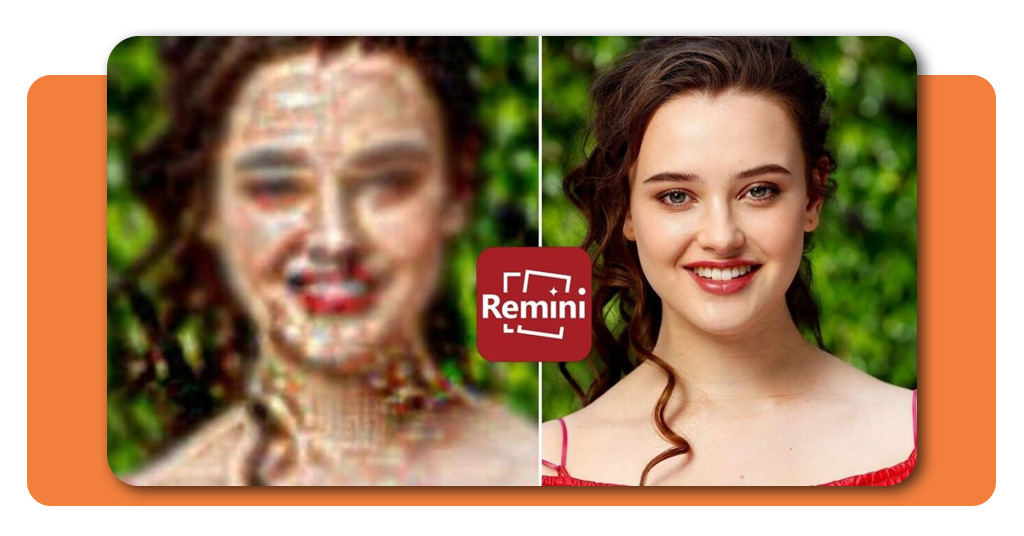
Was setzt Remini apart is its ability to enhance photo resolution automatically using advanced AI. The app analyzes each image, restores lost details, and reconstructs textures that standard filters simply can’t.
The process is surprisingly fast. Within seconds, blurry shots become crisp, clear, and full of life again.
Old prints look freshly scanned, while pixelated screenshots suddenly resemble HD captures. It’s like watching your memories get a professional retouch without ever leaving your phone.
For families digitizing old photos, Remini can bring back faded faces with an eerie sense of realism. And for creators, it can transform social media visuals into high-resolution masterpieces that look straight out of a studio shoot.
If you’ve ever used AI tools before, like those featured in Insiderbits’ guide on photo colorization, you already know how transformative this technology can be.
But Remini takes things a step further, making photo resolution enhancement both powerful and accessible.
Step-by-step: how to enhance images with AI
No complicated setup, no editing experience required, Remini’s appeal lies in how ridiculously simple it is to use. Here’s how you can improve your photo resolution in a few taps:
- Download and open Remini on your device (available for both Android und iOS);
- Upload your image, whether it’s from your gallery, camera roll, or cloud storage;
- Choose the enhancement mode, like portrait, old photo, or standard image;
- Let the AI process the photo — this usually takes a few seconds;
- Preview and save the new version directly to your phone.

4.5/5
You can also fine-tune the results, adjusting sharpness or tone to match your preferences. For professionals, it’s a subtle but valuable addition, ensuring each restored image fits your personal aesthetic.
And if you ever run into technical questions or want to learn more about what’s happening behind the scenes, the official Remini Help Center offers clear explanations of how their AI enhancement process works.
Features that transform old photos instantly
Beyond just fixing photo resolution, Remini’s features make it a go-to for anyone who loves visual storytelling. The app blends technical sophistication with an easy interface that doesn’t intimidate. Here’s what stands out:
- AI photo restoration — It doesn’t just upscale images; it restores them. The AI reconstructs facial details, textures, and light balance to make old or damaged pictures look new again;
- Batch processing — Upgrade multiple photos at once. Perfect for photographers or families digitizing dozens of images from old albums;
- Video enhancement — Yes, it can improve resolution for videos too, turning grainy footage into smoother, higher-quality clips;
- Face enhancer — This feature focuses on portraits, sharpening eyes, skin tone, and facial features for professional results — ideal for profile pictures or content creation;
- Before-and-after slider — See the transformation side-by-side, so you can appreciate just how much clarity the app brings back.
Each of these tools reinforces the app’s goal: to make enhancing photo resolution not just possible, but effortless.
Why improving photo resolution matters
In an age where visuals dominate everything, from social media posts to online portfolios, image quality directly affects how you’re perceived. A sharp photo communicates professionalism, care, and authenticity.
For families, restoring old photos means preserving history. Those blurry childhood memories deserve the same clarity as the moments you capture today.
For creators, higher photo resolution ensures content stands out on feeds that scroll faster than ever.
And while some might turn to heavy editing software, Remini condenses the process into one tap. It’s AI doing what it does best: simplifying the complex and making quality accessible to everyone.
Nach Angaben von Adobe’s photography insights, increasing image resolution has long been one of the toughest parts of editing.
Traditional upscaling often caused distortion or loss of detail, issues Remini’s neural processing now eliminates with astonishing precision.
Where to download Remini
Remini is available for both Android und iOS, making it a universal solution for improving photo resolution anytime, anywhere.
Once installed, it’s the kind of app you’ll wonder how you ever lived without, especially if your photo gallery is filled with memories that deserve a little digital love. Turn blurry pictures into high-quality memories today.
4.5/5
Final thoughts
The photo resolution of your images doesn’t have to limit their potential. With Remini, blurry photos, faded portraits, and low-quality scans can all be transformed into sharp, vibrant images that tell your story with clarity.
In case you’re a content creator, a nostalgic photo hoarder, or just someone chasing perfect pixels, this app delivers what it promises, speed, accuracy, and results you can actually see. Download Remini and enhance your photos instantly.