

Your phone is designed to keep you hooked, and it is very good at its job. Every color, every badge, every notification is engineered to pull your eyes back to the screen before your brain even registers what happened. If you feel like you are losing that battle, Dumb Phone is a minimalist phone app that can take care of that problem. It gives your iPhone a complete reset, putting you back in charge.
This is an Insiderwissen article made to walk you through everything Dumb Phone has to offer. You’ll see how to set it up from scratch, pick up tips to sharpen your focus, and take a real look at what unchecked screen time is doing to your mind. Your phone did not get this distracting by accident, so keep reading and find out what happens when you stop playing by its rules.
Verwandt: Check your attention span and find out if your focus is compromised
Tired of phone addiction? Try this minimalist phone app
Phone addiction is not about weakness. It is about design. Every app you have on your screen was built by a team whose job was to keep you there longer.
Dumb Phone (iOS) takes a different approach. Instead of adding more features to manage your usage, it removes the triggers that cause the problem in the first place.
This minimalist phone app replaces everything visual and distracting on your iPhone with plain text buttons. It’s one of the most practical takes on cutting screen addiction down to size.

Features available in the Dumb Phone app
- Minimalist home screen: replace colorful app icons, wallpapers, and notification badges with clean text buttons that give you access without the visual pull;
- Multiple app launchers: build separate launchers for different parts of your day so only the apps you need are visible at any given time;
- Detox mode: block and hide non-essential apps using “Screen Time” integration, making it harder to fall back into old scrolling habits;
- Control center widgets: switch between launchers directly from your “Control Center” without ever having to dig through your home screen.
Switch between work and leisure launchers
Using a minimalist phone app like Dumb Phone means you can build completely different versions of your home screen for different moments in your day.
A work launcher might show your calendar, notes, and messaging apps. A leisure one might have your podcasts and maps. Neither one bleeds into the other.
Switching between them takes one tap from the “Control Center”. You stay in the right headspace without having to think about which apps should or should not be visible.
Replace distracting icons with text buttons
Every app icon on your phone is a small advertisement. It has a color, a shape, and a badge count, all pulling at your attention before you even make a choice.
When you swap those icons for plain text buttons, something shifts. You open apps because you decided to, not because something on screen caught your eye first.
That is the core idea behind what this minimalist phone app does. Your home screen stops being a wall of triggers and turns into a simple list of tools.

Step-by-step: how to simplify your home screen using the app
Setting up Dumb Phone (iOS) does not take long, but it does change how your iPhone looks and feels in a way that is hard to ignore once it is done.
You do not need to be particularly tech-savvy to get through it. The process is broken into a few clear steps that build on each other naturally.
By the end, your home screen will look nothing like it does right now. That is exactly the point of using this minimalist phone app to take back control of your attention.
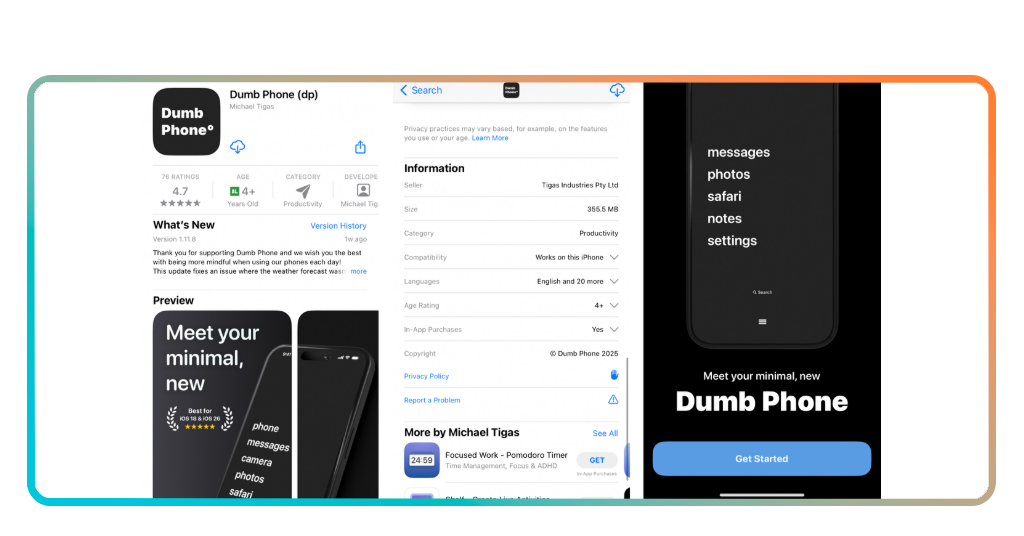
Schritt 1: Lade die App auf dein Handy herunter
Gehen Sie zum App-Store and search for Dumb Phone. It is free to download, and you do not need to commit to anything before seeing how it works on your device.
Once it is installed, open it and take a minute to look around. The interface is clean, and the options are laid out in a way that does not need much explanation.
You’ll be prompted to give it access to certain features on your iPhone. Allow what it asks for, since those permissions are what make the whole setup work properly.
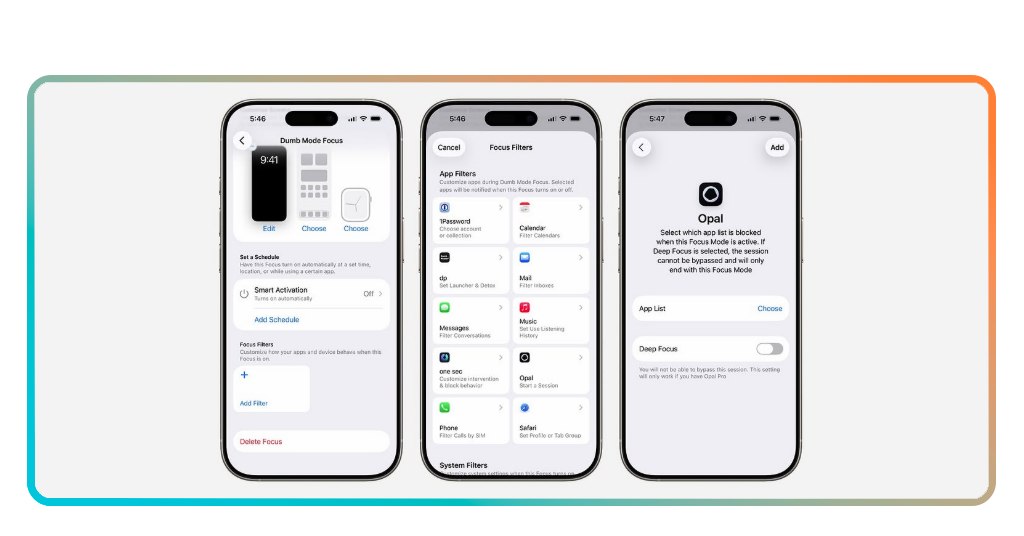
Step 2: select your essential apps and add the widget
This minimalist phone app works by showing only the apps you actually choose. Inside Dumb Phone, you pick which ones make the cut, and everything else disappears from view.
Think about what you genuinely open with intention versus what you open out of habit. That distinction is worth sitting with for a moment before you finalize your list.
Once your apps are selected, add the Dumb Phone widget to your home screen. It will replace your usual app grid with a clean text list of everything you picked.
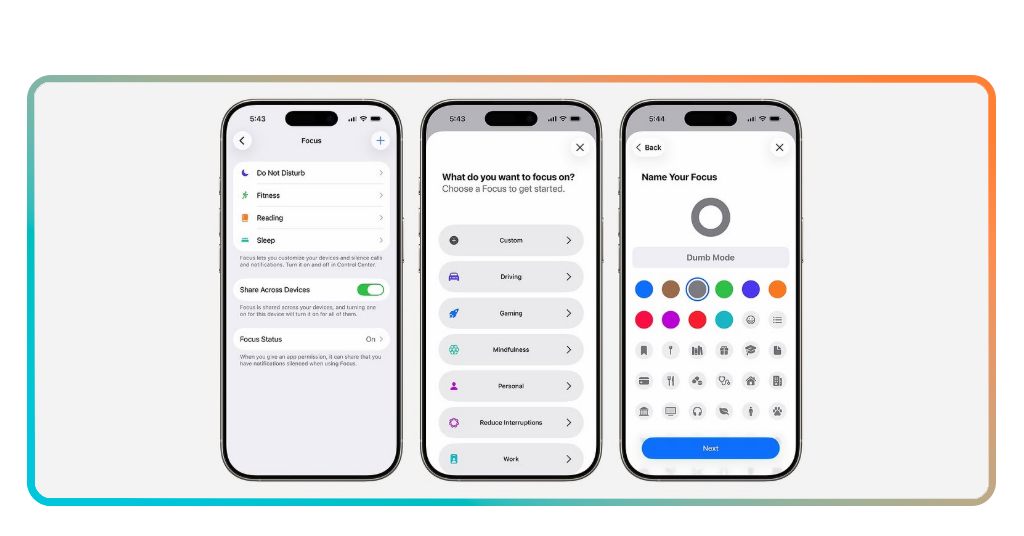
Step 3: set your theme and personalize your screen
Dumb Phone gives you control over how your screen looks beyond just the apps. You can choose between a dark or light theme and adjust the font, size, and text color.
You’ll find that this minimalist phone app gives you enough options to make the screen feel like yours without overcomplicating the whole point of going minimal in the first place.
Pick a wallpaper that does not compete for your attention and keep the overall look as plain as possible. The less your screen excites you visually, the better the whole thing works.
Verwandt: Die besten Apps zur Verwaltung der Bildschirmzeit
Why it’s important to pay attention to your screen time
Most people have no idea how much time they actually spend on their phones each day. The number is almost always higher than what they would guess if you asked them.
Checking your screen time report is one of the more uncomfortable things you can do, but using a minimalist phone app alongside that data gives you something to actually act on.
What you measure, you can change. And changing your phone habits is less about willpower and more about removing the conditions that make bad habits so easy to fall into.
Unconscious scrolling adds up quickly
Opening Instagram for a second and resurfacing fifteen minutes later is not a personal failure. It is what the app was built to do, and it does it extremely well.
The problem is that those fifteen minutes happen several times a day across several apps. By the time you add it up, a significant chunk of your day is simply gone.
Tracking that time puts a number on something that used to feel invisible. Once you see it written out, it is very hard to keep pretending it is not a real issue.
Your attention is your most valuable resource
There is a reason major companies spend billions trying to hold your gaze for as long as possible. Your attention has real value, and someone is always trying to capture it.
Using a minimalist phone app pulls you out of that equation by making your phone less interesting to pick up without a specific reason to do so in the first place.
When you stop giving your attention away for free, you start noticing how much of it you actually have. That shift alone changes how you move through your day.
Small digital habits create big life changes
No single scroll session ruins your focus. It is the accumulation of hundreds of small moments where your attention gets pulled away before it ever has a chance to settle.
Change happens when you replace what your hand reaches for out of habit. Using this minimalist phone app makes your screen stop rewarding mindless pickups for the sake of it.
Do that repeatedly and your brain stops expecting a hit every time you unlock your phone. Over time, you reach for it with a reason, and that changes quite a lot.

Tips for improving your focus
Focus does not disappear on its own. It gets chipped away by a hundred small interruptions that your phone delivers throughout the day without you ever asking for them.
Setting up your phone with a minimalist phone app is one part of the equation. The other part is building a few habits around it that stop your attention from leaking out in the first place.
None of these tips require a complete lifestyle overhaul. They are small adjustments that add up to a phone experience that actually respects where you are trying to put your attention.
Keep essential apps within reach
When the apps you need are buried under folders and pages, you waste mental energy just getting to them. That friction adds up across every single time you pick up your phone.
Dumb Phone (iOS) puts your chosen apps front and center as plain text. You get in, do what you came to do, and get out without anything else grabbing your attention along the way.
Think carefully about which apps genuinely serve you. The shorter that list is, the less time you spend on your phone doing things you never actually planned to do.
Schedule different launchers throughout your day
Using a minimalist phone app with multiple launchers means your phone can reflect what you are supposed to be doing at any given point without requiring any extra thought from you.
A morning launcher might have your news and calendar. A work one keeps things strictly task-related. A night launcher could strip it back even further to just the bare essentials.
The idea is that your phone adapts to you rather than the other way around. That alone removes a surprising amount of low-level decision fatigue from your day.
Turn off notification badges for good
Notification badges are small, but they are relentless. That little red number sitting on an app icon creates a pull that is hard to ignore even when you are in the middle of something else.
Turning them off inside this minimalist phone app is one of those changes that feels minor until you realize how often your eyes were drifting toward them without you deciding to look.
You’lll still get your messages and updates. You’ll just stop being summoned by a number on a screen every time something happens that someone else decided was worth your attention.
Verwandt: Take Control of Your Screen Time with QualityTime
Less on your screen means more in your life
Dumb Phone is not a perfect solution, but it is an honest one. It does not promise to fix your habits overnight, it just stops your screen from working against you.
In diesem Leitfaden, Insiderwissen covered a minimalist phone app that shows you how taking back control of your screen time is more accessible than it looks.
Browse more on Insiderwissen, and you will find articles on focus, productivity apps and digital habits that help you get more out of your time. There is plenty more worth your attention.





