Parenting in the digital age is basically a full-time job. Between memes, reels, and DMs, keeping tabs on what your teen sees online can feel like trying to herd cats — chaotic, unpredictable, and a little bit impossible. But Instagram is making an effort to change that narrative.
With the launch of Instagram Teen Accounts, the platform has introduced a safer, more transparent way for families to navigate social media. From time limits to restricted content, Instagram now gives parents and guardians actual tools to guide how young users engage online, without turning it into a surveillance mission.
- Get Paid by Instagram With the New Referrals Program
- Hide Instagram Activity for maximum privacy today
- Wie aktiviert man die Zwei-Faktor-Authentifizierung auf Instagram?
Instagram teen accounts: parental controls and safety
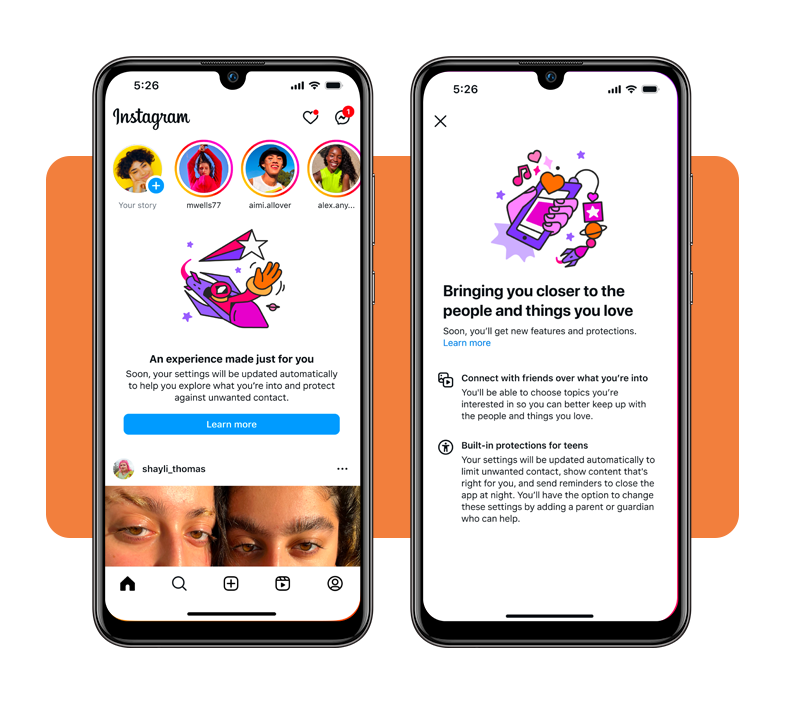
Instagram Teen Accounts are designed for users aged 13 to 17, and they come with built-in privacy and safety settings from the moment the account is created.
When a teen signs up, the app automatically applies restrictions, like limiting who can message them and who can see their content.
Parents, through the Family Center, can monitor activity without invading privacy. It’s not about reading messages or scrolling through posts, instead, here you can understand habits: screen time, new followers, and account settings.
This new setup is Instagram’s response to the ongoing conversation about teen safety online, one that’s been building for years.
The platform now encourages open dialogue between parents and teens, focusing on digital well-being rather than punishment.
Instagram’s official announcement emphasizes education and control: both teens and parents learn to balance freedom and safety.
And if you’ve ever wished TikTok had something similar, you can check out how parental controls work on TikTok to compare.
Step-by-step: set up teen mode and restrictions
Setting up Instagram Teen Accounts is refreshingly straightforward. You won’t need to dig through endless menus or deal with cryptic tech jargon. Follow these steps to activate the right controls:
- Open the Instagram app (available on Android und iOS) and sign in or create a new account;
- Go to “Settings” → “Family Center” to begin setup;
- Invite your teen to connect their account to yours — this link must be accepted;
- Choose the monitoring level, including screen time limits and daily usage reports;
- Activate restricted mode to control who can message or follow your teen;
- Review notifications from the Family Center about your teen’s activities and requests.
Once configured, the Family Center becomes your dashboard for managing and tracking digital habits. You can adjust settings anytime, ensuring the right balance between oversight and trust.
Instagram even offers detailed guidance in its help center, where each parental feature is broken down for clarity.

4.5/5
Features that protect young users online
Instagram Teen Accounts aren’t just about time limits. The platform has layered protection tools designed to make the online environment healthier for young users without stripping away their sense of independence. Here’s what stands out:
- Default private accounts, meaning only approved followers can view posts and stories;
- Sensitive content filters, automatically reducing exposure to mature or harmful topics;
- Limited DMs, blocking unwanted messages from adults who don’t follow the teen;
- Screen time management, allowing daily limits and reminders to log off;
- AI-powered content monitoring, flagging and removing inappropriate or risky interactions.
Every setting can be adjusted based on comfort level, giving parents control while allowing teens to grow in a safe digital space.
Instagram also rolled out Quiet Mode, a feature that mutes notifications during homework or rest hours. Teens can schedule downtime, ensuring their feed doesn’t interfere with sleep or focus.
It’s part of a broader effort to reduce digital fatigue, something every social media user — not just teens — could use a bit more of.
The role of Family Center
Die Family Center is the central hub for managing Instagram Teen Accounts, acting as the bridge between parents and their teens. It offers insights without judgment and structure without smothering. Inside it, guardians can view:
- How much time a teen spends on the app;
- Who follows or messages them;
- The types of content their teen interacts with;
- Activity summaries and requests for additional supervision.
The design is deliberately transparent. Teens receive a notification whenever a new supervision request or setting change occurs, which keeps communication open.
According to Instagram’s parental control guide, the platform’s philosophy is simple: empower families to have informed conversations rather than enforce hidden restrictions.
Why this matters
The digital landscape for teens has changed dramatically in the last decade. Social media is now a core part of identity-building and social interaction, for better or worse.
Instagram Teen Accounts represent a more responsible approach to that reality, acknowledging that total restriction isn’t realistic, but smart supervision is.
By enabling tools that encourage open dialogue, Instagram gives families the ability to teach digital literacy instead of simply enforcing rules. A modern compromise, and one that other platforms are likely to follow.
Parents can rest a bit easier knowing that the algorithm isn’t running unchecked in their teen’s feed. Meanwhile, teens get the independence they crave with the added safety net they might not realize they need.
And for those who prefer official resources straight from the source, Instagram’s safety guide breaks down privacy, reporting, and safety measures in simple, accessible language.
Where to learn more
You can explore the latest updates about Instagram Teen Accounts directly on Instagram’s website or download the app on your preferred platform (both Android und iOS)
These accounts are free and available to anyone, though family supervision tools are most relevant for users under 18.
If your goal is to foster a healthier relationship between your teen and technology, these settings are a good place to start. Discover Instagram’s new tools for family safety.
4.5/5
The takeaway
In 2025, safety and freedom can finally coexist online. Instagram Teen Accounts are proof that social media doesn’t have to be the wild west for young users.
With thoughtful design and parental collaboration, it’s possible to enjoy the digital world without sacrificing peace of mind. So, yes, your teen can still share their selfies, reels, and inside jokes.
But now, they can do it in a space designed to protect their privacy and emotional well-being. Set up a Teen Account and manage screen time easily.