A busy workday with back-to-back video calls leaves little room for jotting down decisions, deadlines, or names, which makes an AI meeting note taker app an essential tool to have.
Minutes turns those videos into transcripts and summaries in minutes, and this guide from Insiderwissen walks you through every feature so your next call ends with answers, not scribbles.
Verwandt: Posture corrector for remote workers: eliminate your back pain

4.9/5
Looking for a reliable AI meeting note taker app?
Minutes (Android | iOS) records meetings from your phone or computer and converts spoken words into organized text as it happens, giving you a full transcript ready for review or search.
Beyond plain transcription, this AI meeting note taker pulls key points, decisions, and action items into a summary you can scan without rereading the entire conversation.
You can upload existing recordings, pull notes from YouTube links directly, or start a new live recording right inside the app the moment a call begins.
Features available in the Minutes app
- Live audio recording: capture meetings straight from your microphone without opening a separate app, then let Minutes (Android | iOS) convert every word into a searchable transcript;
- File upload support: send an existing audio recording from your device into the app and receive a complete transcript along with a summary;
- YouTube video notes: paste any video link into the app and get a written transcript plus a summary without watching the whole clip yourself;
- Chat with your notes: ask questions about a past recording and get direct answers pulled from the transcript instead of scrolling back through everything.
Trusted by remote teams everywhere
Team members who live across different time zones rely on organized written records to stay aligned when live calls overlap with someone’s early morning routine or a packed night.
A shared transcript lets you catch up on missed discussions easily, so decisions made during any call reach your entire team without requesting a recap meeting.
Multiple languages detected automatically
A global team often mixes multiple languages inside one call, and switching between them mid-conversation confuses most standard transcription tools built for a single spoken language.
Minutes (Android | iOS) detects each spoken language and updates the transcript to match, making this AI meeting note taker a solid pick for your team handling more than one idiom.
Free plan versus premium perks
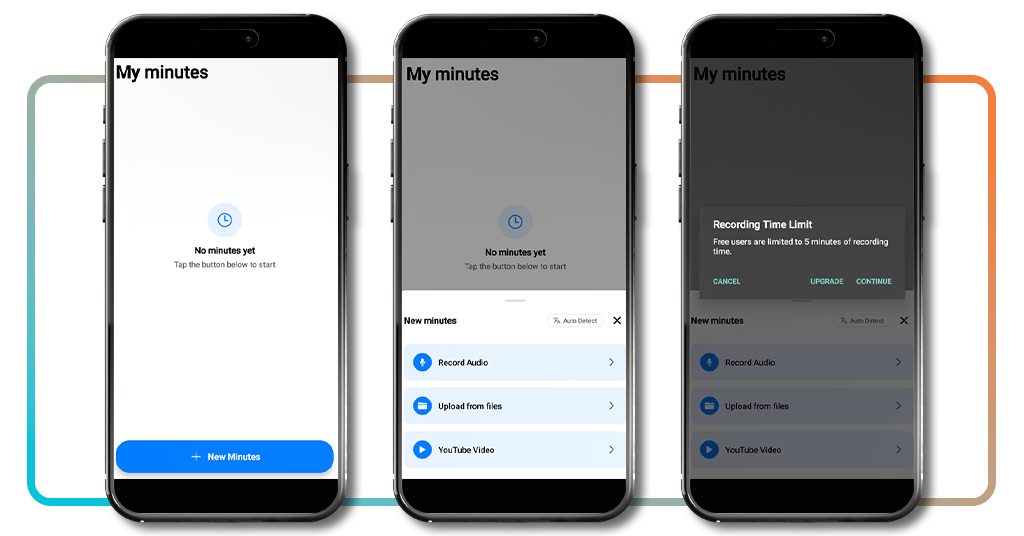
The free version caps every recording at five minutes, which works fine for quick voice memos but falls short once your calls run past a short warm-up.
Upgrading removes that recording cap and adds chat access for asking your notes direct questions, plus faster processing through priority access to the app’s top AI models.
Verwandt: Escape the commute: secure your future with these remote careers
Step-by-step: how to automate transcriptions using the app
Getting a usable transcript from a recorded meeting conversation used to mean replaying the audio again and again while typing every sentence into a blank document by hand.
Minutes (Android | iOS) cuts that entire process down to a few taps. This AI meeting note taker handles the listening and typing while you focus on the conversation itself.
Setting things up takes no time at all, and once your account connects, every recording or upload turns into readable text as soon as you need it.
Schritt 1: Lade die App herunter und registriere dich
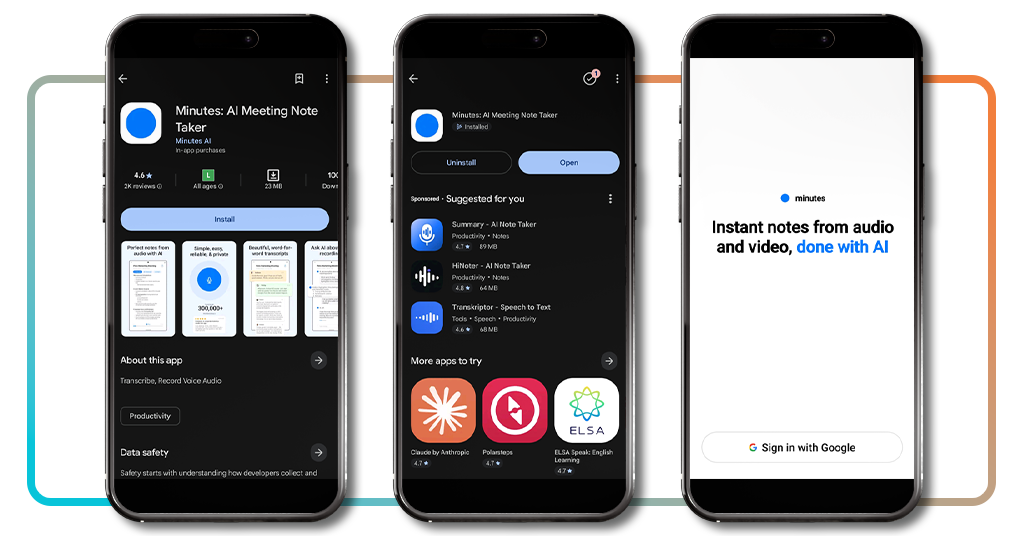
Grab your phone, go to the App-Store oder Google Play and search for ‘Minutes: AI Meeting Note Taker’. Tap to download it and wait a few seconds until that’s done.
Next, open the app and tap the Google sign-in button at the bottom of the opening screen. Pick the account you want linked and allow access to the app.
Step 2: choose your audio or video source
Once you’re signed in, tap the ‘+ New Minutes’ blue button on the home screen, then pick how you want to add a conversation, whether recorded live or already saved there.
Recording captures whatever plays through your microphone, uploading pulls from files stored on your phone, and this AI meeting note taker can work from a pasted YouTube link.
Step 3: let AI transcribe and summarize
Once you pick a source, Minutes gets to work right away, converting spoken words into readable text and organizing everything into a transcript sitting right inside the app.
The finished summary highlights decisions, action items, and key points pulled from the conversation, giving you a fast reference without forcing you to sift through the transcript itself.
Security tips and device compatibility for remote workers
Working from home or a coffee shop means your meetings happen across whatever device sits nearest, and that mix of locations raises some real questions about keeping data safe.
Minutes runs on Android, iOSund web, so switching between your phone and laptop during a busy work week never means losing access to a saved transcript.
Blending personal and professional accounts on the same device makes it easy to overlook basic precautions, and treating this AI meeting note taker like a banking app helps.
Store recordings in a safe location
Every recording you make holds details from a real conversation, so picking where that file lives on your phone matters as much as the words captured inside it.
Keeping every transcript inside the app instead of forwarding it through messaging threads keeps sensitive meeting details away from accounts outside your control or personal trust circle.
Keep your Google account protected
Your Google account connects directly to every recording and transcript stored inside the app, making it the single strongest point worth protecting above every other login you manage.
Turning on two-factor authentication adds a second lock beyond your password, giving this AI meeting note taker and every linked account far stronger protection against unwanted access.
Review app permissions often
Apps request access to your microphone, storage, and contacts for different reasons, and granting every request without a second thought can leave more of your phone exposed.
Opening your phone settings and checking what Minutes (Android | iOS) can access is an easy process, and turning off anything unnecessary keeps your data exposure limited to real needs only.
Update regularly for security patches
New app versions often patch security gaps discovered after the last release, and skipping those updates leaves older vulnerabilities sitting on your phone far longer than they should.
Turning on automatic updates through the App Store or Google Play means every fix reaches your phone without you needing to remember to check for a new version yourself.
Verwandt: Bilingual remote jobs: best job opportunities for immigrants
4.9/5
Your meetings, minus the note-taking hassle
Minutes (Android | iOS) takes the stress out of meetings by turning every conversation into text you can search, save, and come back to whenever you need it.
In this guide, we explained how this AI meeting note taker records, transcribes, and organizes your calls so nothing important slips through during a busy workday.
Stay with Insiderwissen and learn more ways to make working from home easier, exploring handy productivity apps and tools built for a smoother, simpler workday.