Picking up the drums sounds exciting until you sit down and realize you have no idea where to begin. Most practice sessions turn into frustration when there’s no structure behind them, and YouTube rabbit holes rarely get you anywhere close to playing a real song. Finding a solid drum lessons app that tells you exactly what to do each day, in the right order, makes all the difference between spinning your wheels and genuinely improving.
Musora is built around guided, follow-along lessons taught by famous drummers and touring professionals who know how to break things down in a way that sticks. This Insiderwissen guide covers everything from the app’s features and how to get started to drumming real songs and keeping your progress on track. If picking up the sticks and playing something you’re proud of has been on your list for a while, now is the time to learn.
Verwandt: Always wanted to play an instrument? Try this piano lessons app

4.7/5
Start your musical journey with a drum lessons app
Musora (Android | iOS) covers guitar, piano, bass, singing, and drums, with a dedicated drum program built to take you from your very first beat to playing real songs.
The drum lessons run on a daily method that tells you what to work on each session, so you spend your time playing instead of second-guessing.
Every feature inside this drum lessons app is designed to keep your sessions productive, your technique on point, and your progress moving in the right direction.
In der App verfügbare Funktionen
- Guided learning path: Musora builds your daily sessions around a structured method that shows you what to practice and when you’re ready to move ahead comfortably;
- Professional drum charts: every song comes with accurate transcriptions and drum charts so you can read along and follow the full arrangement without losing your place;
- Tempo and loop tools: you can slow any song down or loop a tricky section until your hands and feet start locking in the rhythm together;
- Offline downloads: lessons and songs are available for local storage, so you can keep practicing even when you don’t have a reliable internet connection nearby.
Learn from Grammy-winning drum professionals
Chad Smith, Kenny Aronoff, and a roster of touring pros are your instructors inside this drum lessons app, bringing real stage experience into every single session.
These musicians have played sold-out arenas and recorded with some of the most recognized names in the industry, and that depth comes through in the lessons.
Each session is broken into digestible pieces you can follow at your own pace, so the instruction never feels like it’s pitched above your current level.
Track your progress at every stage
Every time you finish a lesson, Musora logs it automatically, building up a full picture of your drumming history without any manual input on your end.
You can log offline sessions inside this drum lessons app too, so time away from the screen still counts toward your overall activity and daily goals.
Your profile keeps a live calendar of practice days alongside your personal stats, giving you an honest read on your consistency and how far you’ve come.
Step-by-step: how to play the drums and master the rhythm using Musora
Setting up Musora (Android | iOS) takes only a few minutes, and once you’re in, the app walks you through everything so you always know right where to start.
There’s no hunting around for lessons or figuring out what to tackle first, because the app lays out a path tailored to your schedule and skill level.
Starting with this drum lessons app feels approachable at any level, whether you’ve never touched a kit or you’ve been playing casually for a while.
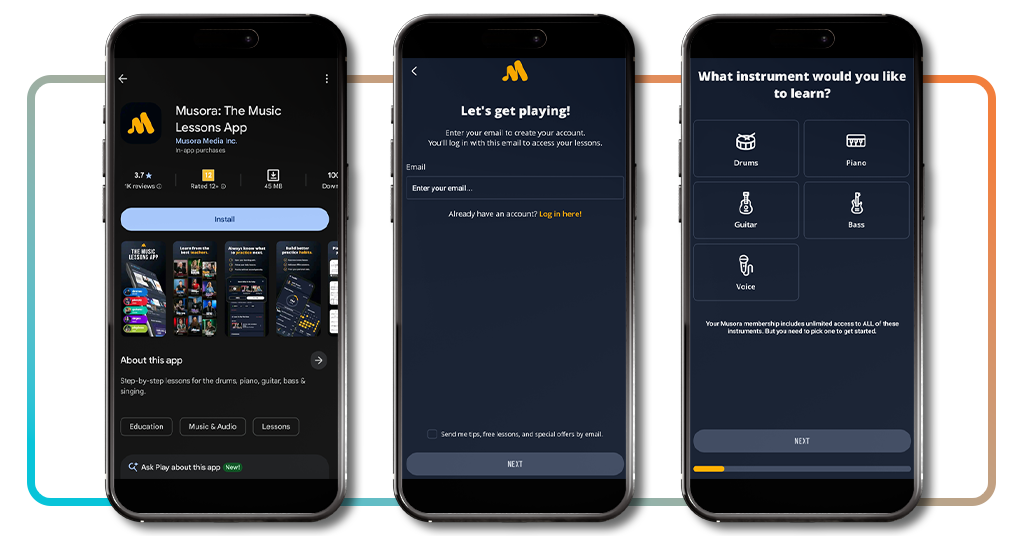
Step 1: download the app and set up your account
Get your phone and access the App-Store oder Google Play. Then, search for ‘Musora’ and download the app for free, kicking off the account setup right away.
You’ll enter your email, create a password, and the app takes you through a short onboarding flow that personalizes your entire drumming experience from the start.
The app costs $ 29.99 per month, but a 7-day free trial kicks in automatically once your account is live, giving you full access to every drum lesson without entering any payment details upfront.
Step 2: pick your skill level and drum goals
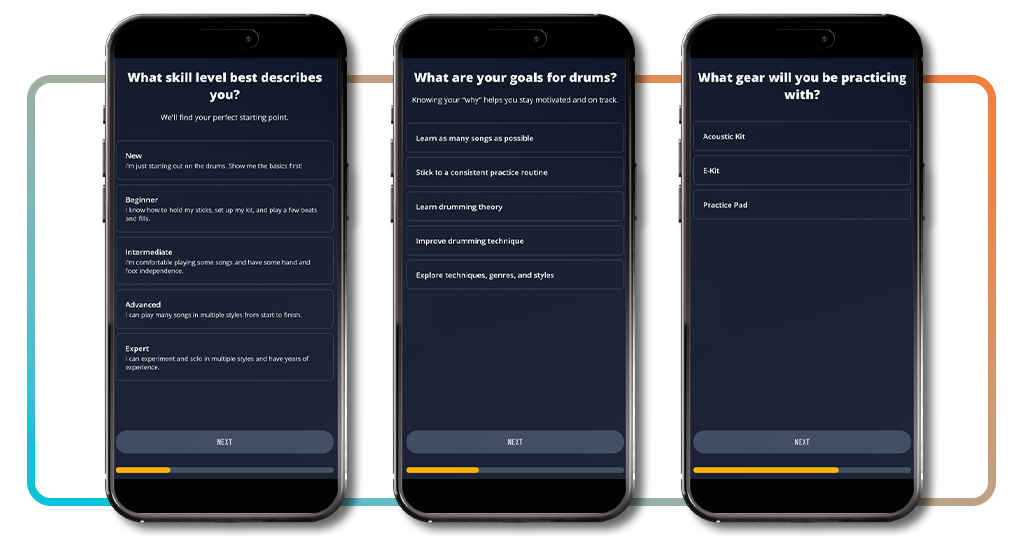
Right after signing up, this drum lessons app asks you to pick your skill level, from brand new to advanced, so lessons meet you where you are.
You’ll also nail down your drumming goals, whether that’s learning songs, sharpening technique, building a solid routine, or exploring different genres and styles on the kit.
Then the app asks what gear you’re using and how many days a week you plan to play, so the path built fits your schedule.
Step 3: follow your daily method lessons
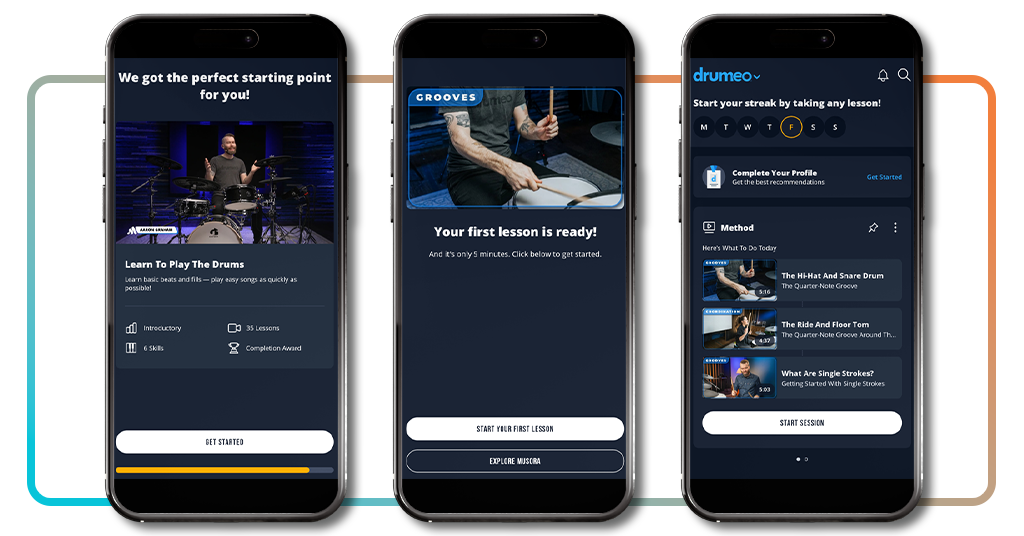
Once your setup wraps up, Musora drops you straight into your Method, a daily lesson plan that tells you what to play and in what order.
Your first lesson inside this drum lessons app runs around 5 minutes, so there’s no pressure to carve out a big chunk of time right away.
A daily streak tracker marks every session you complete, so your consistency starts showing up as a pattern you can look back on with real satisfaction.
Verwandt: Gitarrenunterricht für Anfänger: Meistern Sie die Grundlagen mit Apps
Easy-to-learn songs on the drums
One of the best parts of learning how to play the drums is that you don’t have to wait very long before you’re banging to the rhythm of the songs you already know and love.
The library inside this drum lessons app covers over 5,000 titles across rock, pop, jazz, funk, and metal, so there’s no shortage of world hits and personal favorites to browse through.
Each song also comes loaded with a drum chart, tabs, and a play-along track, so you’re reading, listening, and playing all at once from day one.
Pick songs from a 5,000-song library
Songs like Nirvana’s “Smells Like Teen Spirit”, Tears for Fears’ “Everybody Wants to Rule the World”, and The Killers’ “Mr. Brightside” are all in there waiting.
Musora lets you filter songs by genre, difficulty, and instrument. Doing so allows you to find tunes that are in line with your current level instead of scrolling until you find what you want.
Simplified versions of popular songs let you tackle something recognizable without needing advanced chops, so you’re playing music right from the early days of practice.
Slow down any song to your pace
The tempo tool inside this drum lessons app lets you dial any song down to the speed you need before working back toward the original pace.
Slowing a song like “Good Times Bad Times” down gives you room to place each hit where it belongs, and you’re not rushing through patterns your hands aren’t ready for.
Once a section feels solid at a lower tempo, you can nudge the speed back up in small steps until you’re playing at the full original pace that John Bonham created.
Loop the sections you need most
Musora lets you drop a loop pin anywhere in a song, so instead of restarting the whole track, you zero in on the exact eight bars giving you trouble.
That’s huge for something like the verse groove in Foo Fighters’ “Everlong” or the syncopated kick in “Take the Money and Run” by Steve Miller Band, where one bar throws off the whole feel.
Repeating tight loops inside this drum lessons app trains your muscle memory the same way a private lesson would, minus the hourly rate and the commute to a studio.
How to keep improving at drumming
Improving at drums doesn’t happen in a single session; it’s the time you stack week after week that turns shaky patterns into locked-in grooves you can fully count on.
The progress tools inside this drum lessons app show you where your time is going, which sessions you’re nailing, and where the weak spots still live in your playing.
Improvement on the kit is less about raw talent and more about showing up consistently, revisiting what tripped you up, and pushing into territory that feels uncomfortable at first.
Add practice sessions to your log
Every time you sit down outside of a guided lesson, you can log that session manually so your full practice time gets counted and tracked properly in one place.
You add the date, duration, and notes you want to keep, so two months later you can scroll back and see a concrete record of the time you invested.
That kind of record holds you accountable in a way memory alone never does, especially when motivation dips and you need real proof that you’ve been showing up consistently.
Revisit lessons to reinforce your skills
Going back to earlier lessons inside the drum lessons app is how you find out whether a skill truly stuck or just felt like it did in the moment.
Revisiting your first hi-hat and kick coordination lesson after a full month shows you how much your foot independence has developed since you first worked through that tricky pattern.
Instructors recommend cycling through foundational rudiments on a regular basis, the same way a runner returns to form drills, no matter how many finish lines they’ve already crossed.
Push limits with advanced drum workouts
Once your basics are solid, Musora has workouts built around limb independence, double bass, and odd time signatures that will push your current skill set even further.
The “30-Day Independence” course inside this drum lessons app is built to push intermediate players past the place where self-taught drummers find themselves stuck for months.
Taking on a Tool or Porcupine Tree song in the library after months of structured practice gives you a concrete read on how far your drumming has honestly traveled.
Verwandt: Beat maker app: make pro beats on your phone with BandLab
4.7/5
Every great drummer had a first beat
If your kit has been collecting dust or you’ve been playing around without any real direction, Musora gives you the structured plan that makes your practice sessions finally count.
In diesem Leitfaden, Insiderwissen covered how this drum lessons app connects you with world-class instructors, a massive song library, and a daily method to help you improve.
Explore more of Insiderwissen for other articles on learning guitar, piano, bass, and singing, so every instrument you’ve ever wanted to pick up has a solid starting point waiting for you.