
A lost Android phone is more than a missing device. It holds memories, private chats, saved passwords, and personal tools. Losing it feels like misplacing a part of your daily life.
Instead of guessing where it went, use Google’s Find Hub to track it. It rings your phone, locks the screen, and shows where it was last seen, even offline.
This guide by Insiderwissen gives you everything needed to act fast and stay in control when your phone disappears. Learn how to secure your data and recover your phone now!
Verwandt: Share files on Android instantly and for free
Find lost Android: your ultimate guide
| Preisgestaltung: | Frei. |
| Verfügbar für: | Android. |
A missing phone creates instant disruption. Without it, daily tasks, messages, and apps slip out of reach. Panic sets in faster than expected, especially when time feels limited.
Google’s Find Hub is a practical solution. It brings together tracking tools for phones, tablets, earbuds, and other devices, helping you locate what matters from a single, easy interface.
Knowing how to recover a lost Android gives you a clear advantage. Instead of wasting energy retracing steps, you can start fixing the problem before the trail goes cold.

4.6/5
Act fast before the battery runs out
Time works against you when a device is missing. Every minute matters, especially when the battery starts to drain and location updates become less reliable with each passing hour.
A quick search with another device can trigger a sound alert, even if the phone was silenced. That feature alone helps users recover their phone in nearby locations.
Keeping your device charged and location tracking enabled offers better results. The more prepared your settings are, the better chance you have of acting before power runs low.
Use any screen to take control
Access to a second device makes a big difference when locating a lost Android. You don’t need to wait. A tablet, computer, or borrowed phone works just fine.
Sign in with your Google account and track your device using Find Hub. The platform lets you ring the phone, display a custom message, or lock it remotely.
Even without your phone in hand, these remote actions help protect sensitive information. It takes just a few clicks to take control and prevent further complications.
Assist others with their lost devices
People around you might not know what steps to take. Offering help with device recovery is easier than expected and shows how useful Find Hub can be for everyone.
A missing phone can be stressful. Knowing how to support someone with a lost Android makes the process less confusing, especially when you already understand how the tool works.
Whether helping a friend, sibling, or parent, your guidance might be the reason they recover their phone quickly. The steps are simple but make a meaningful difference when shared.
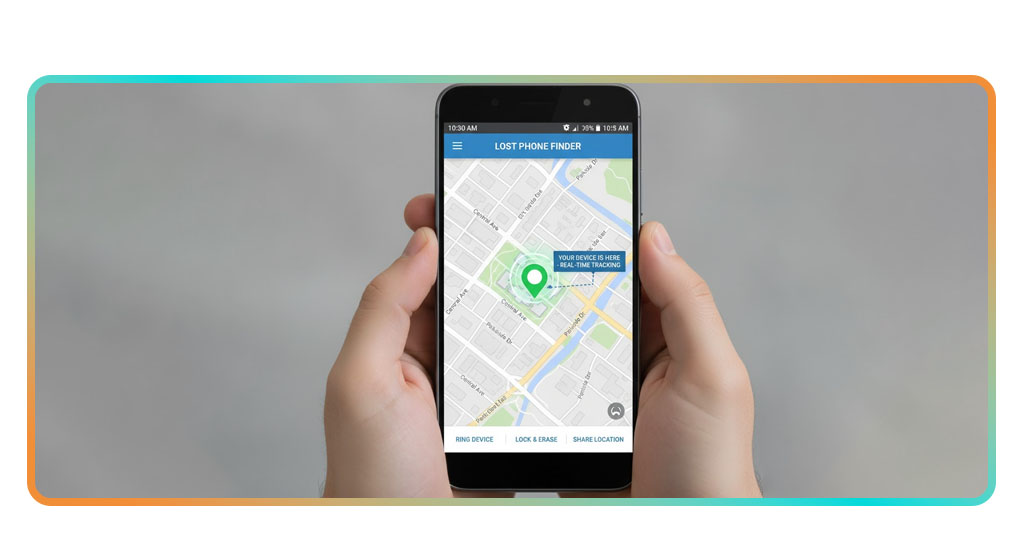
Features that work even if phone is offline
Phones don’t always stay connected. A drained battery, switched-off signal, or weak network may cut the connection, but that doesn’t mean your tools stop working in the background.
Google’s Find Hub saves device location history and lets you act even after disconnection. That means help is available long after your phone stops updating in real time.
These offline features give you an extra layer of support. Whether tracking movements or sending alerts, you still have actions to take even when the phone is no longer online.
View the last known device location
If your lost Android is out of service or powered down, Find Hub still shows where it was last active. That location might offer enough information to take action.
The saved position helps identify when and where the phone disconnected. Even without real-time updates, this point on the map can guide your next steps or lead to recovery.
This feature is especially helpful when dealing with public spaces. If you left the phone at a store, café, or park, the last location will point you in the right direction.
Play a sound, even if it’s silent
Losing a phone at home or work happens more than people expect. In these cases, triggering sound alerts helps recover a lost Android that’s still within your surroundings.
Even when the phone is on silent mode, Google’s Find Hub bypasses audio settings. It plays a loud ringing tone designed to cut through background noise and distractions instantly.
Try checking beneath furniture, inside bags, or under stacks of clothes. The ringing continues for several minutes, giving you time to follow the sound before it stops again.
Remotely lock, erase, or leave message
If your device seems truly gone, remote options give you tools to protect your data. These features offer peace of mind while keeping your information from falling into the wrong hands.
A lost Android might still reach someone honest. Leaving a message on the lock screen can help return it. You can include instructions or a contact number if needed.
For more security, Find Hub lets you lock the screen with a new password or erase the phone completely. These steps are useful when recovery is no longer certain.
Verwandt: Android Operating System Covers Every One of Your Needs
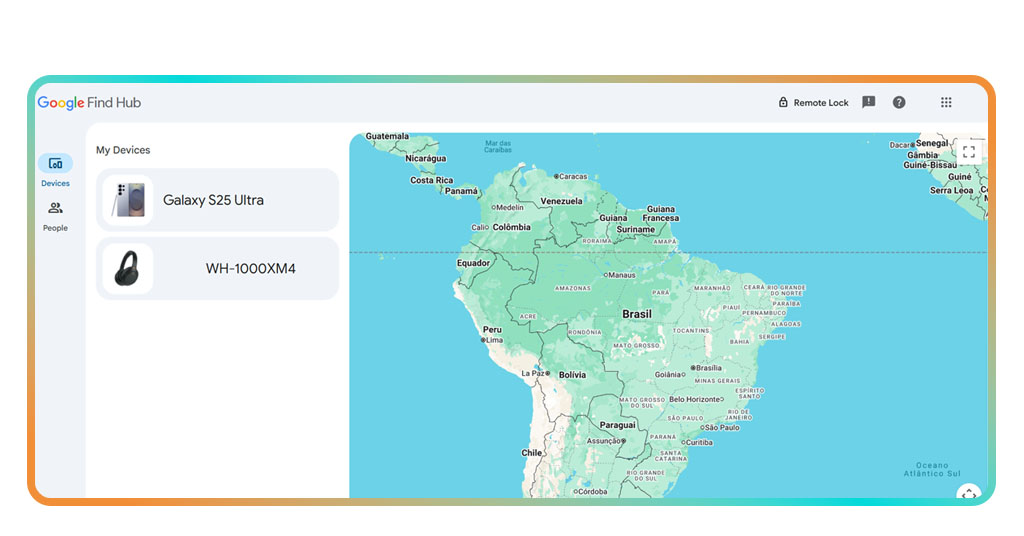
Where to access Google Find My Device
Finding your phone depends on quick access. Google Find My Device was designed to be simple, giving users control from browsers, apps, or shared screens whenever they need it.
You don’t need complex installations. Through Google’s Find Hub, you can log in, locate, or secure your phone using familiar tools available on any connected device with minimal effort.
Whether at home or traveling, being prepared to access this service is essential. Once you understand where to reach it, recovering your device becomes faster and far less stressful.
4.6/5
Log in from any device instantly
Anyone with a lost Android can access Google Find My Device from virtually anywhere without installing new software or setting up special permissions first.
Using a browser is one of the easiest methods. The platform lets you ring your phone, check its location, and protect your information remotely in real time.
Keep this option bookmarked for quick use. Having it ready ensures you can act fast the moment you realize your phone is gone.
- Besuchen Sie die Mein Gerät finden website from any browser on a phone, computer, or tablet;
- Enter the account credentials linked to your Android phone or accessory securely;
- Choose the missing device from the list to view its location or perform remote actions.
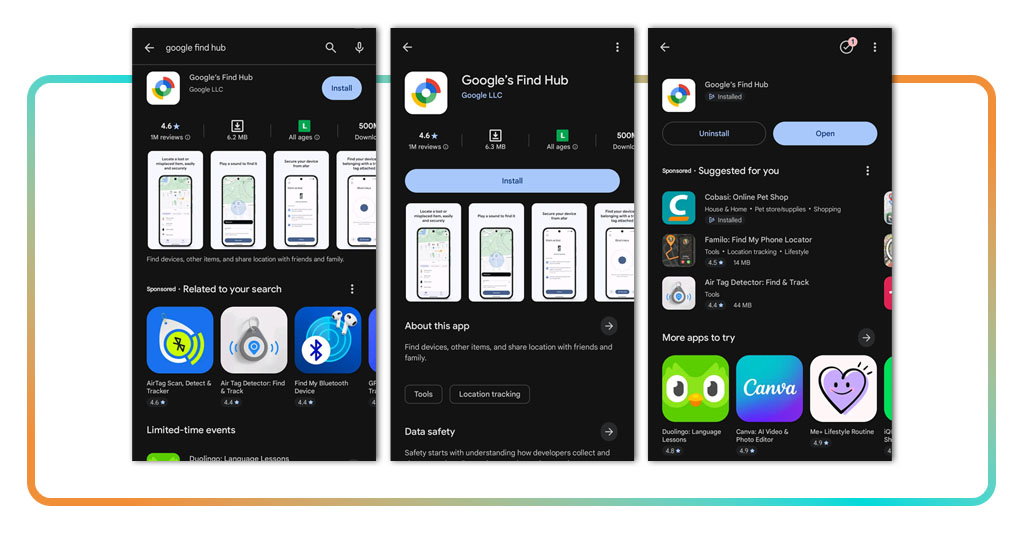
Download the app on Android or tablet
If you prefer faster access, installing the Find My Device app helps you manage a lost Android without needing a computer. It’s designed for convenience and quick mobile recovery.
After signing in, the app automatically displays every connected phone, tablet, or accessory. You can track, check locations, and execute commands through your Android interface.
Keeping the app installed provides constant access, letting you secure your devices immediately if something unexpected happens, wherever you are in the world.
- Open the Play Store and search “Google’s Find Hub” to download the app;
- Tap “Install”, then open the app and accept required permissions for proper operation;
- Sign in using your Google account and start managing connected devices.
Your data stays private and protected
Google Find My Device keeps your actions private using encryption. Every step you take stays secure while you track, lock, or erase your phone safely using Google’s Find Hub tools.
Even during recovery, no one can see your account details or location. When you search for a lost Android, your data isn’t stored, shared, or saved by Google.
Only you can manage your devices, send alerts, or erase everything. That control means your information stays safe, even if your phone ends up somewhere unexpected.
Step-by-step: how to activate location tracking
Turning on location tracking prepares your phone for emergencies. It connects your device to Google’s system, allowing you to act quickly if your phone ever goes missing unexpectedly.
These steps only take a few moments. Once activated, your phone sends accurate updates so you can locate, ring, or lock it even when you’re far away.
Setting this up gives you peace of mind every day. If something happens, you’ll be able to stay in control and find your lost Android phone in minutes.
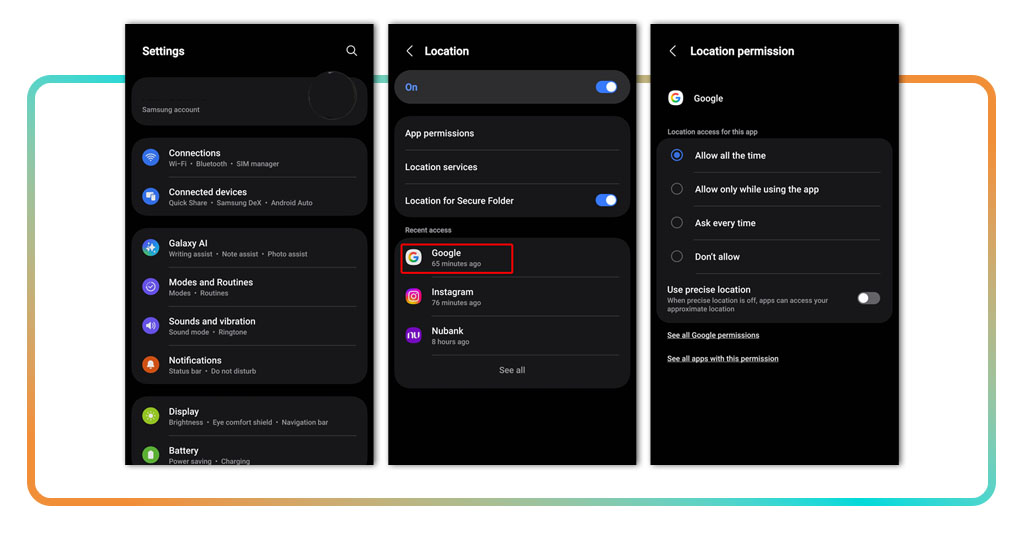
Step 1: switch on your phone’s location setting
Your phone must share its position before any tracking feature works. Turning on location is the first essential step for building a complete recovery setup.
You can activate this directly from the settings menu. The toggle controls how Google reads and updates your device’s real-time location automatically across connected services.
Leaving it on keeps your phone trackable. It ensures Google always knows its last recorded position even when disconnected temporarily or turned off unintentionally.
- Open “Settings” and search for “Location” using the magnifying glass at the top;
- Tap the “location” option, then switch the toggle to “On” to enable tracking features;
- Keep this feature active so Google can record your device’s coordinates.
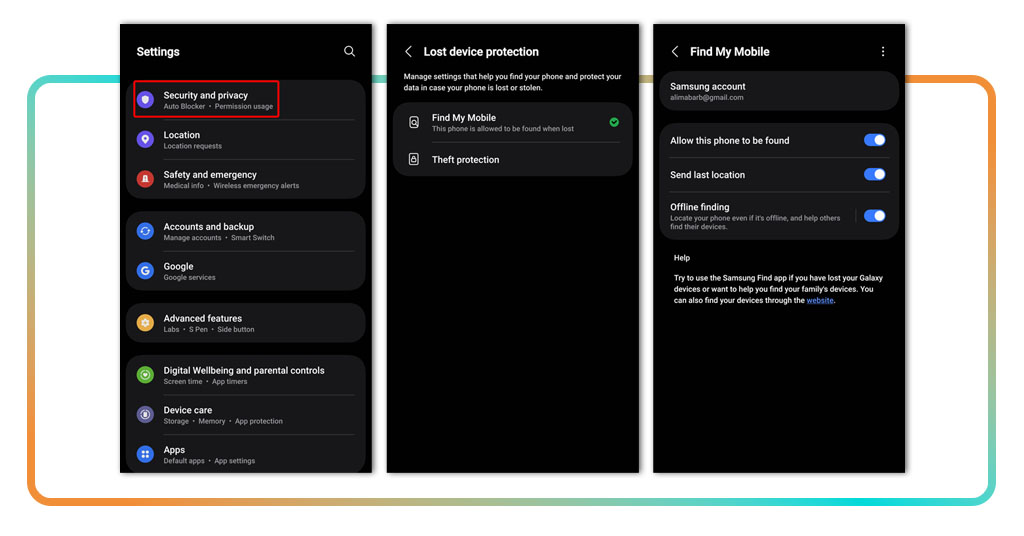
Step 2: activate Find My Device in security menu
To recover a lost Android later, you must enable Find My Device inside the phone’s security settings before anything unexpected happens or your device disappears.
This connects your phone to your Google account. Once active, it gives you tools to lock, erase, or locate your device remotely whenever needed.
If this setting is disabled, Google can’t find your phone. Turn it on now and prevent future tracking complications or unnecessary delays during recovery attempts.
- Go to your “Settings” and tap “Security”, or search for “Find My Device” directly;
- Open the Find My Device option and check if the toggle switch is currently active;
- If disabled, tap the toggle to “On” and confirm access for your linked Google account.
Step 3: confirm your device is now visible
After you’ve turned on location and Find My Device, open Google’s Find My Device website in a browser. Sign in using the Google account linked to your phone.
If you ever need to locate a lost Android, that same device should appear on the map once logged in. This confirms that location tracking and recovery options are active.
When your phone’s name and location display correctly, the setup is complete. You’ll know tracking works properly, letting you react instantly if your phone goes missing.
- Öffnen Sie die Mein Gerät finden site from any browser or use the official app;
- Sign in with the Google account linked to your phone’s active location tracking settings;
- Confirm your device is on the map, showing its current or most recent position.
Verwandt: Hidden Android Features That Will Amaze You
Your Android’s safety is always in your hands
Google’s Find Hub helps you stay calm when things go wrong. It keeps your phone visible, your data safe, and your tracking tools ready whenever you need them.
Written by Insiderwissen, this guide walks you through every step for finding a lost Android quickly, proving how simple Google’s official tools make recovering your phone effectively.
Discover more helpful articles at Insiderbits that simplify technology for everyday users. Learn easy ways to protect devices, manage apps, and make your digital life feel effortless!