Putting in the laps but not seeing the results is one of the most frustrating feelings in swimming. When every session looks the same and your times refuse to budge, the problem isn’t your effort, but the lack of a plan built around you. A swim workout app takes what you already do in the pool and turns it into goal-oriented, progressive training that adapts as you grow.
MySwimPro works like a personal coach, pairing customized plans with performance tracking that learns from every session you log. This Insiderwissen guide walks you through every feature in the app, from downloading it to reading your results. Keep reading, and you’ll see how swapping aimless laps for a structured plan is the one change that makes every session in the pool count.
Verwandt: Beyond the Pool: Swimming Apps To Transform Your Summer

4.5/5
What’s the best swim workout app?
MySwimPro (Android und iOS) is a training app that builds swim plans around your speed, goals, and skill level, so every session has a clear direction from the moment you hit the water.
It tracks your performance over time and adjusts your intervals as you improve, which means the app gets more useful the longer you stick with it and train consistently.
For swimmers who want real coaching without hiring someone poolside, this swim workout app delivers guidance, detailed analytics, and a full workout library right from your phone.
Features available in the app
- Personalized training plans: the app builds a plan around your swim level, goals, and availability, giving you a new workout every single day of the year without repetition;
- Detailed performance analytics: it tracks stroke data, split times, and SWOLF scores after every session, telling you where you’re improving and where you’re not;
- Workout and dryland library: from stroke-specific swim sets to land-based strength workouts, the library covers every angle of training so you’re never stuck;
- Custom workout builder: if the planned sessions don’t fit your schedule or equipment, you can build your own workouts from scratch and log them directly inside the app.
Track your progress in open water and pools
Whether you’re doing laps in a 25-meter pool or tackling an open water course, this swim workout app logs every session and keeps it all organized inside your profile.
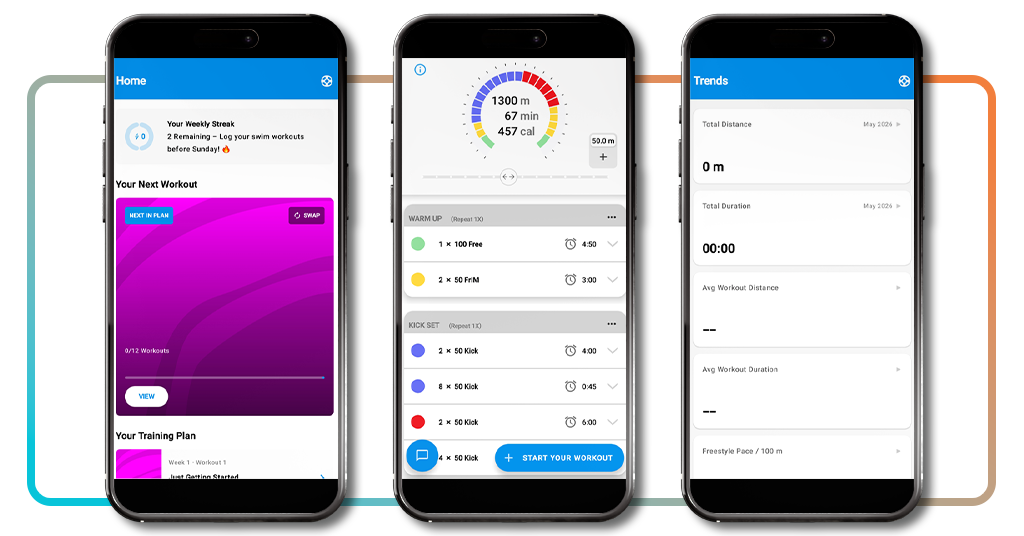
The ‘Trends’ tab pulls together your total distance, average pace, and session duration over time, giving you a running record of how your training has shifted from week to week.
Looking at that data regularly helps you figure out which parts of your training are producing results and which ones need a different approach to move forward.
Sync the app with your smartwatch
Pairing MySwimPro with a compatible Garmin or Wear OS watch means your guided workouts show up directly on your wrist, so you never need to interrupt a set to check your phone.
Connecting this swim workout app to your watch also means every rep, rest, and interval gets recorded automatically, keeping your performance data accurate without any manual input.
The sync works both ways, so updates to your training plan on your phone carry over to your watch, and completed workouts on your wrist feed straight back into your profile.
Step-by-step: how to download and use the app on your mobile phone
MySwimPro (Android und iOS) is free to install, and the whole setup from download to first workout takes less time than your average warm-up set at the pool.
What makes the process worth paying attention to is the onboarding, where the app collects everything it needs to build a plan that’s specific to how you swim right now.
Skipping steps here would actually work against you, so taking a few extra minutes to set things up properly is what makes the swim workout app deliver from day one.
Step 1: download the app and create your account
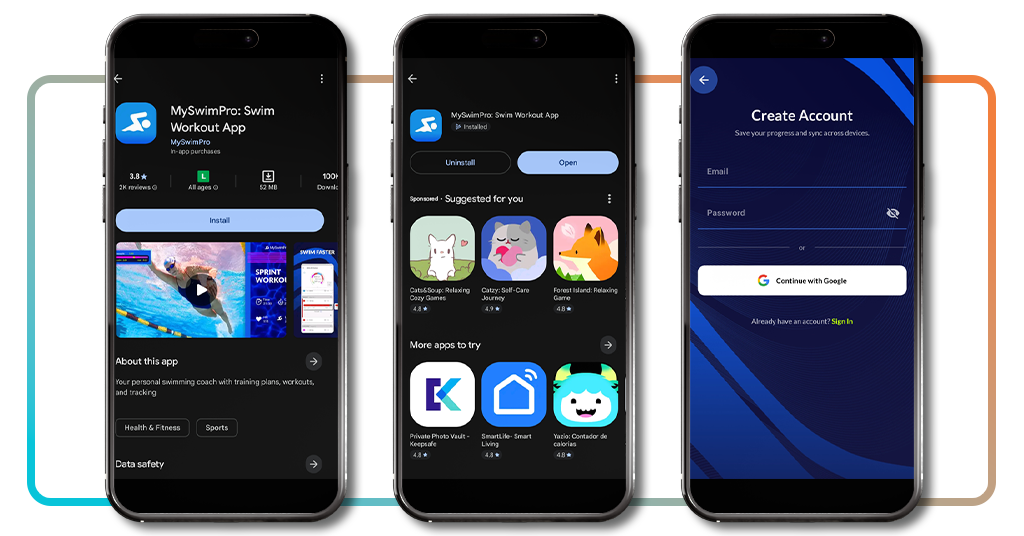
Öffnen Sie die App-Store if you’re on iOS or the Google Play Store if you’re on Android, search for ‘MySwimPro’, and tap ‘Get’ or ‘Install’ to get it onto your phone.
Once it’s downloaded, open the app and tap ‘create account’ to register with your email and a password, or skip the form entirely and sign up using your Google account.
Creating your account saves your progress across devices and keeps your workout history intact, so everything you log stays connected to your profile, no matter where you train.
Step 2: build your swimmer profile
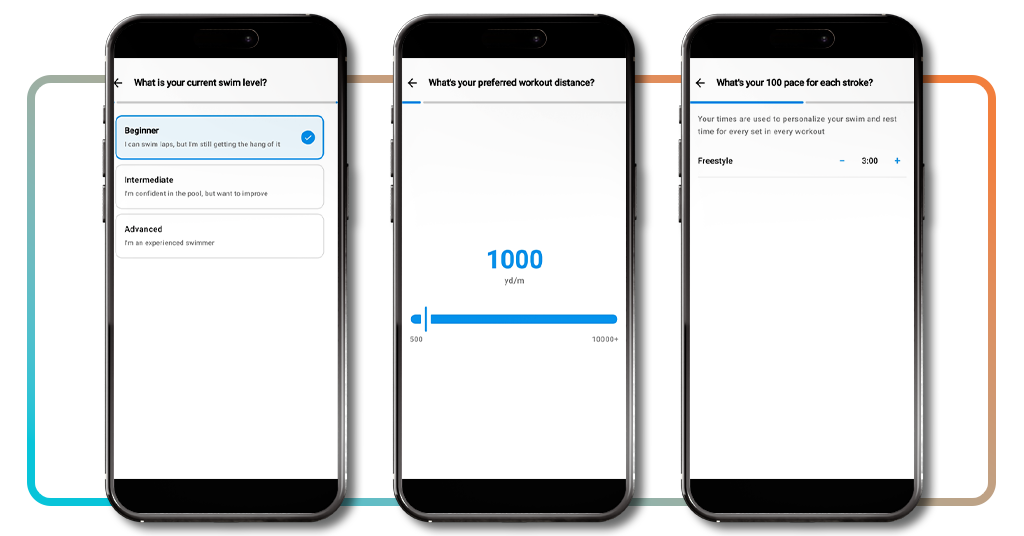
Right after signing in, MySwimPro’s onboarding kicks off, and the swim workout app asks you a series of questions to build a training plan that fits you specifically and nobody else.
You’ll select your swim level, pick your goals from options like weight loss, open water racing, or improving technique, and set your preferred workout distance using a simple slider.
From there, the app asks about your pool length, which strokes you swim, your 100-meter pace for each stroke, your available equipment, and which days of the week you train.
Step 3: jump into your training plan and start swimming
Once the profile is complete, you land on the home screen where your first workout is already queued up and labeled as Week 1, Workout 1 under your training plan.
Tap ‘View’ on the workout card to see the full session breakdown, including warm-up sets, main sets, and rest intervals, all laid out with timing and distance for every rep.
When you’re ready to go, hit ‘Start your workout’, and the app takes over from there, walking you through each set so all you have to focus on is your swimming.
Verwandt: Certified Lifeguard Training: Get Started With This Free Course
Do I need to pay to use the MySwimPro app?
The app runs on a subscription model, which means full access to your personalized training plan, guided workouts, and performance tracking requires an active paid plan.
The pricing is straightforward, and the value you get scales with how seriously you take your training, so the more you use it, the more sense the investment tends to make.
For swimmers who want to try it out before committing any money, the swim workout app gives you a 7-day free trial to explore everything the paid plan includes.
Start with a 7-day free trial
The trial gives you full access to MySwimPro Coach for 7 days, which means you can go through the onboarding, get your training plan, and complete workouts before paying anything.
It’s enough time to swim a full week on your personalized plan, check your analytics after each session, and get a genuine feel for how the app fits your training routine.
No commitment is required to start the trial, so if the app doesn’t match what you were looking for, you can walk away without being charged anything at all.
Monthly vs yearly: picking your plan
The swim workout app gives you two subscription options once your trial wraps up: a monthly plan at $19.99 and a yearly plan at $99.99, which works out to a significantly lower rate.
If you’re planning to swim consistently over several months, the annual plan saves you a meaningful amount compared to paying month by month over the same period of time.
The monthly option suits swimmers who want flexibility, while the yearly plan rewards those who are committed to the long game and want to keep their costs predictable.
A training plan built around your level
Every plan inside MySwimPro (Android und iOS) is built from the ground up using the information you provide, so it reflects your current ability rather than a generic template anyone could follow.
Subscribing to the swim workout app unlocks personalized training for every day of the year, customized intervals for each set, and target splits calculated specifically for your pace.
The plan also evolves as your swimming improves, with the app suggesting tighter intervals over time so you’re always working at the edge of your current ability and not coasting.
How to improve your swimming
Most swimmers focus on distance and frequency, but what actually moves your times forward is the quality of what you do between the walls and how closely you pay attention to it.
Tracking your stroke data, following a structured plan, and using a swim workout app to connect those two things is what separates swimmers who plateau from those who keep getting better.
MySwimPro (Android und iOS) gives you the feedback loop that casual training never provides, so every session adds to a growing picture of where your swimming stands and where it needs to go.
Train with stroke-specific workouts
MySwimPro’s library breaks workouts down by stroke, so if you want to dedicate a session entirely to breaststroke or backstroke, you can pull up a targeted set built around exactly that.
Each session is built around the specific demands of that stroke, with sets and drills that address the technique, timing, and conditioning required to swim it with more control.
Dedicating regular sessions to individual strokes builds the kind of efficiency that compounds over time, and you’ll start to feel the difference in your body before you even check your times.
Use SWOLF data to refine your technique
SWOLF combines swimming and golf into one concept, and just like in golf, a lower score wins. It adds your stroke count per length to your time to measure efficiency.
The score gives you something concrete to work toward in every session, so instead of swimming by feel, you have a number that tells you how well you moved through the water.
Tracking your SWOLF inside the swim workout app over time shows you whether your techniques are working or whether you’re putting in more effort for the exact same result.
Take on monthly challenges and push harder
MySwimPro (Android und iOS) runs monthly challenges that give your training a specific target to chase, which adds a layer of accountability that a regular workout schedule on its own doesn’t always provide.
Competing through the swim workout app puts you on a leaderboard alongside other swimmers, so your motivation gets a push from something external rather than just willpower.
The challenges are calibrated to work alongside your training plan, so taking one on adds intensity to your month without pulling you off the progress you’ve already built up.
Verwandt: Top 10 Übungs-Apps für jedes Ziel
4.5/5
Dive in and let the data guide you
MySwimPro takes the thinking out of training and replaces it with a personalized plan, so every session you complete is pushing you toward a real, measurable goal in the water.
In diesem Insiderwissen guide, you discovered how a swim workout app can transform your time in the pool into purposeful, data-driven training that reflects exactly how far you’ve come.
Keep browsing Insiderwissen for more articles about exercise apps that help you stay on track, monitor your performance, and squeeze the most out of every session you put yourself through.