
Watermarks were created to protect content, not to haunt it forever. Yet anyone who works with images knows the frustration: a logo cutting across a product photo, a text stamp ruining an otherwise perfect visual, or a stock preview that is unusable for drafts. As digital content circulates faster than attribution rules evolve, tools that remove watermark elements have become part of everyday creative workflows.
The conversation around watermark removal is no longer just about aesthetics. When used responsibly, a remove watermark solution can help designers, marketers, and content creators clean images they legally own or are authorized to edit. Apowersoft Watermark Remover positions itself exactly in this space, combining automation and image preservation through AI-based processing.
How to remove watermark from photos automatically
Removing a watermark manually used to mean cloning tools, pixel-by-pixel corrections, and a level of patience few professionals could afford.
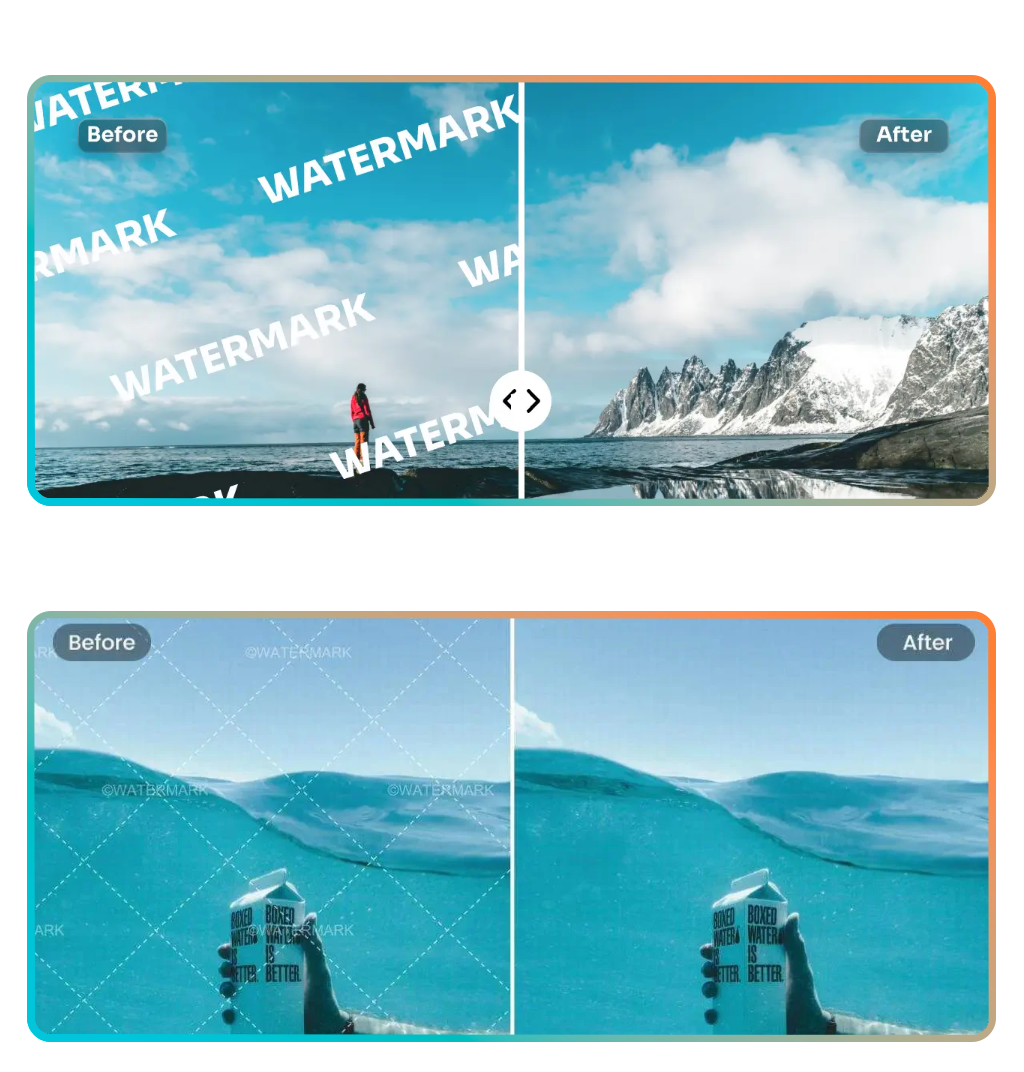
Modern remove watermark software shifts that burden to artificial intelligence, analyzing surrounding pixels and reconstructing the background with minimal user input.
Apowersoft Watermark Remover relies on object detection algorithms that identify text overlays, logos, and unwanted graphic elements.
AI-assisted tools outperform manual edits in both speed and consistency, especially for repetitive tasks.
In place of editing each image individually, users select the watermark area and let the software process the removal automatically. This makes the tool particularly useful for batches of images that share similar overlays.
Step-by-step: clean your images in seconds
One of the defining advantages of Apowersoft Watermark Remover is its low learning curve. The interface is designed for users who want results without navigating complex editing panels. A typical workflow includes:
- Uploading an image directly through the interface;
- Selecting the watermark area using brush or selection tools;
- Letting the AI analyze the surrounding background;
- Previewing the cleaned image before export;
- Downloading the final file without visual distractions.
Is precision selection combined with automated background reconstruction. By reducing manual intervention, the remove watermark process becomes accessible even to users without design experience.
Features that preserve quality and details
When watermark removal is done poorly, the result is obvious and often unusable. Blurred areas, broken textures, and uneven lighting are instant red flags, especially in professional contexts.
PicWish Watermark Remover, by Apowersoft, approaches the task differently by combining selective removal, format flexibility, and controlled output, ensuring edits remain discreet and visually coherent. Key features include:
Precision watermark selection for photos and videos;
The tool offers three distinct selection modes, allowing users to target logos, text, or unwanted objects with accuracy.
For video content, watermarks can be erased only from specific segments, leaving untouched sections intact, which is essential for clips where branding appears intermittently.
Batch processing for multiple files and overlays;
PicWish supports removing watermarks from several images or videos simultaneously. This feature is particularly valuable for creators handling large volumes of media, as it eliminates repetitive manual adjustments and speeds up production workflows.
Full support for common image and video formats;
Compatibility extends across most widely used file types, enabling drag-and-drop imports without conversion issues. This reduces friction when working with mixed media libraries or content sourced from different platforms.
Custom watermark creation with text or images;
Beyond removal, the software allows users to add protective marks using icons or text.
Hundreds of built-in fonts are available, with full control over size, transparency, position, color, and visual effects, making watermarking as flexible as it is functional.
Original quality output with smart file optimization;
PicWish automatically balances compression and clarity during export. The processed files retain their original visual quality while being optimized for easier sharing and storage, avoiding unnecessary degradation or oversized outputs.
By focusing on control rather than shortcuts, PicWish ensures that removing or adding watermarks does not compromise the integrity of the content.
The remove watermark function here is technical, not destructive, which makes it suitable for drafts, mockups, and internal presentations.
Who should use a remove watermark tool
Not every image should be altered, and not every watermark should disappear. That said, there are legitimate scenarios where watermark removal is part of responsible content handling. Common use cases include:
- Designers cleaning licensed stock images for final delivery;
- Marketers preparing visuals for campaigns after purchasing rights;
- Content creators removing app-generated watermarks from their own work;
- Businesses updating branded visuals after rebranding;
- Individuals restoring personal photos affected by camera overlays.
Ethical boundaries and legal considerations
It is impossible to discuss watermark removal without addressing boundaries. Watermarks exist to protect intellectual property, and removing them without permission can violate copyright laws.
The ethical distinction lies in ownership and authorization. Removing a watermark from content you do not own or have licensed is not a technical issue but a legal one.
Apowersoft does not promote misuse. Its positioning focuses on automation and quality for legitimate editing scenarios. Responsibility remains with the user, which is standard across all image-editing platforms.
Where to access the tool
Apowersoft Watermark Remover is available as a desktop application for Windows. The software can be downloaded from Apowersoft’s official website and is compatible with Windows 7, 8, 10, and Windows Vista.
Integration with other visual tools
Watermark removal often sits within a broader image preparation pipeline.
For example, creators producing official documents or identification images may combine editing tools with resources like the one detailed in this Insiderbits’ guide to ensure visuals meet technical standards.
In professional environments, a remove watermark step usually comes before resizing, color correction, or export formatting. Having a fast solution reduces friction between these stages.
Practical takeaway for creators and designers
Apowersoft Watermark Remover does not try to replace full photo editors. Its value lies in focus. Perfect your photos in seconds with AI precision.
By automating a single, time-consuming task, it frees users to concentrate on composition, messaging, and delivery. Clean your images instantly and make them ready to share.
Remove watermarks automatically — it’s fast and free.