
Have you ever caught a killer beat and wondered how fast it’s playing? This song analyzer app answers that question, turning your phone’s microphone into a pro tempo and key reading tool.
We at Insiderbits put together this guide to BPM Analyzer, covering every feature from auto detection to tap tempo, so you can finally nail the perfect pace for any track you love. Read on!
Related: Trending Sound Finder: Apps to Discover Viral Music Early

4.5/5
Looking for a reliable song analyzer app?
BPM Analyzer (Android) reads the tempo of any song playing around you, using either your phone’s microphone or your own taps on the screen to calculate an accurate result.
The app’s “Auto Detect” feature listens through your speaker in real time, while “Tap Tempo” counts your rhythm by hand, giving this song analyzer app two ways to decode a BPM.
Each reading pairs with a tempo name like “Allegro” or “Presto”, plus genre hints such as Pop, House, or Drum and Bass, so you always know the song’s vibe.
Features available in the Auto BPM app
- Auto detect: point your phone toward any nearby speaker and let the microphone pick up the beat, delivering a live tempo reading in moments;
- Tap tempo: tap along to the beat at least four times and get a precise reading without any background noise or microphone access needed;
- Tempo names and genre hints: see whether your track sits at Andante, Allegro, or Presto, plus genre suggestions like Pop, House, or classic Trance;
- Half and double correction: fix common octave errors with a single tap, adjusting a doubled or halved reading back to the track’s true tempo.
Built for DJs, dancers, and teachers
Spinning records at a party calls for quick tempo checks between tracks, and you can grab that instant number without pulling out extra gear or expensive software.
Dance instructors building new routines and music teachers prepping a lesson plan both rely on this song analyzer app to match choreography or exercises to the right pace.
Your audio stays private on device
Every reading happens on your phone, and the microphone only measures the sound in the room without storing a single clip or sending anything over the internet.
You never need to worry about recordings sitting on a server somewhere, because BPM Analyzer (Android) processes each beat in real time and discards it right after the reading.
Simple design anyone can use
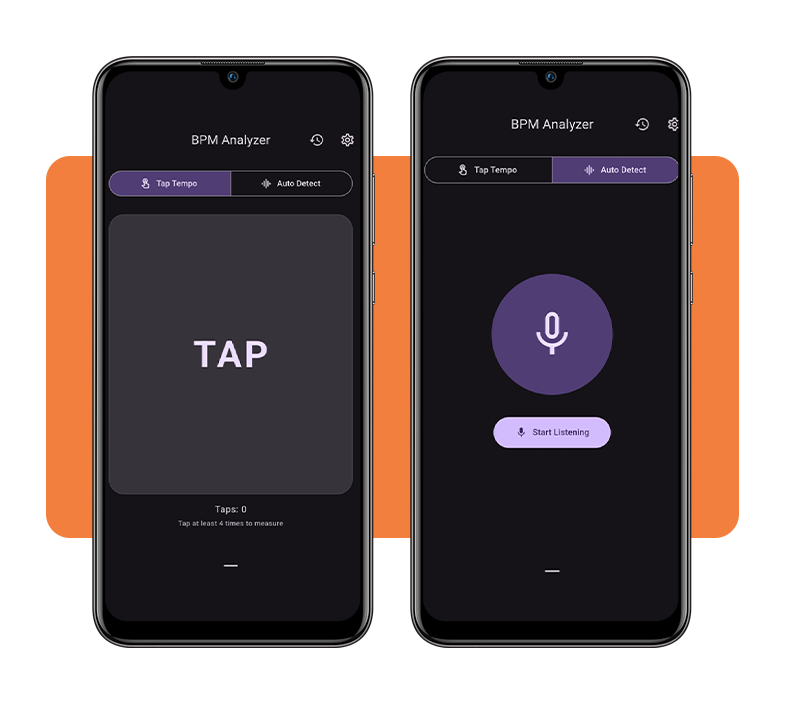
The layout keeps two clear tabs at the top, “Tap Tempo” and “Auto Detect”, so you switch between methods without digging through any confusing settings screens.
Bold numbers, a pulsing circle, and clean buttons for “Half”, “Double”, and “Save” make this song analyzer app easy to read even while you’re moving or dancing around.
Related: Remove vocals from any song free: try this vocal remover app
Step-by-step: how to find BPM and key using the app
Grabbing a tempo reading takes less effort than scrolling through your phone for the right playlist, since BPM Analyzer (Android) walks you through the process from install to result.
You’ll pick between listening through your speaker or tapping the beat yourself, then let the song analyzer app crunch the numbers and hand you a clear reading within seconds.
Once you see that number, you can save it with a memo, flip between half and double time, or go back and analyze another track altogether.
Step 1: download the app on your device
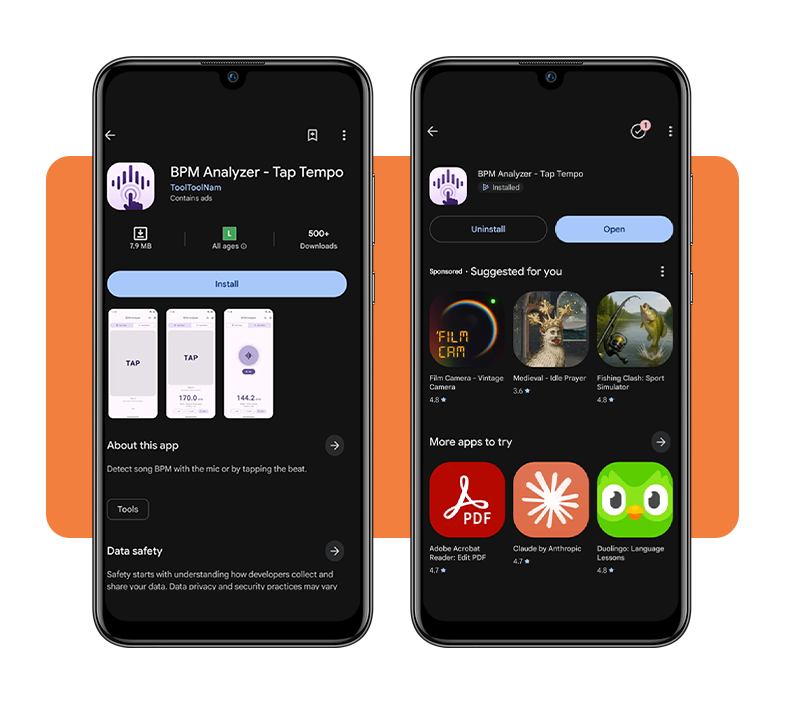
Head to the Play Store, search for ‘BPM Analyzer’, and tap ‘Install’. The app is very light, storing less than 8 megabytes, so it should load onto your phone almost instantly.
The app is completely free to use and doesn’t ask for account creation. Once installed, you’ll find the tap tempo screen waiting for you first, ready for whenever you want.
Step 2: pick Auto Detect or Tap Tempo
Choosing ‘Auto Detect’ means holding your phone near a speaker and letting the microphone do the work, which suits crowded rooms or tracks playing from another device.
Tap Tempo works better for songs stuck in your head or playing somewhere you can’t point a microphone toward, and this song analyzer app only needs four taps to start reading.
Step 3: allow microphone access to begin
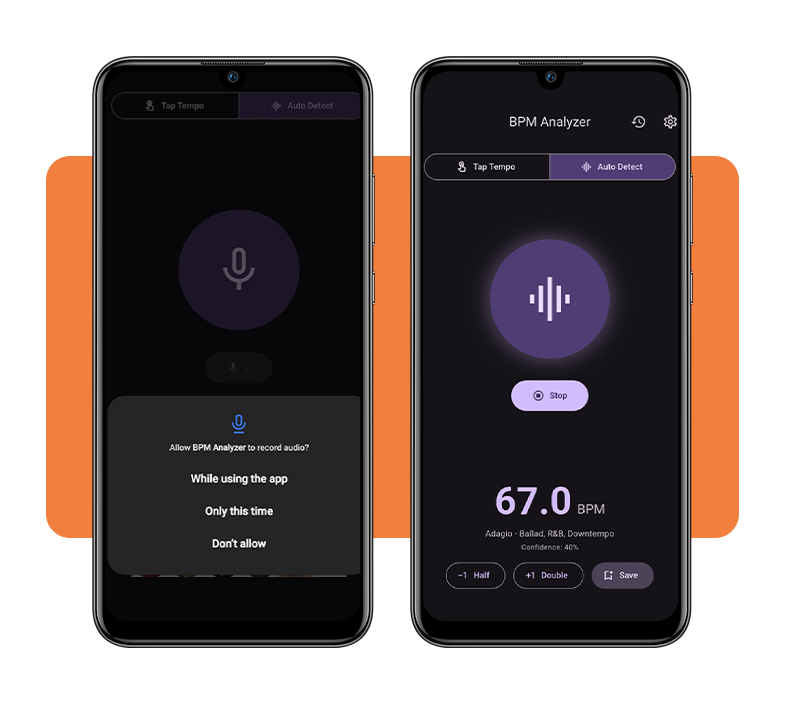
“Auto Detect” can’t function without microphone permission, so tap “Allow” when the prompt pops up, choosing between full access or a one-time listen for that session.
Nothing is recorded or stored during this process. The app analyzes sound as it happens and immediately discards it after calculating your tempo reading.
Step 4: read, save, or adjust your BPM
Your BPM shows up in large text alongside a tempo name and genre hint, giving you enough context to judge whether the reading matches what you expected.
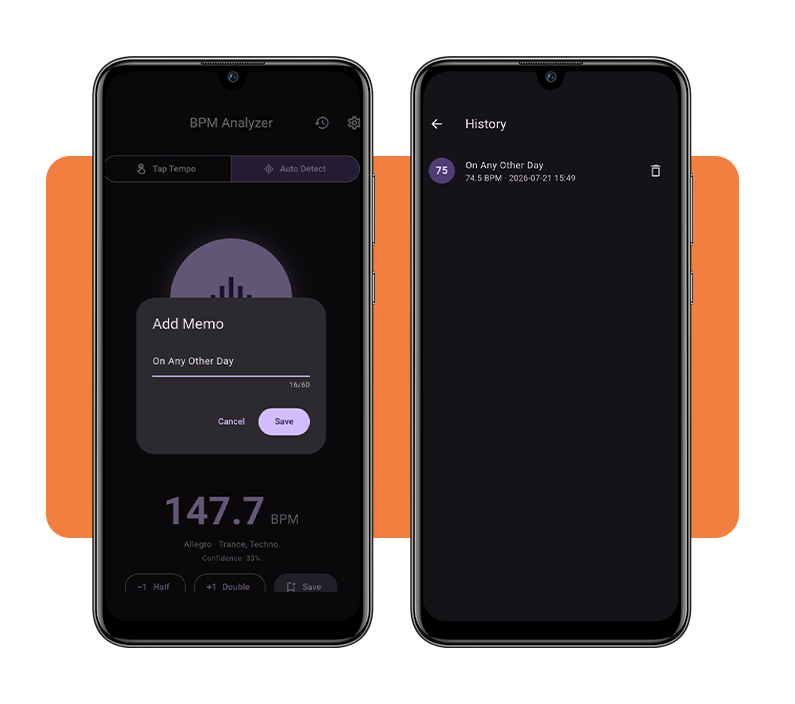
If the number looks doubled or cut in half, tap the correction buttons to fix it, then hit save to log the result with your own song memo.
Tips for accurate analysis
A blank stare at a confusing BPM reading usually means one small factor threw off the calculation, and fixing that factor takes far less effort than you’d expect.
Distance from the sound source, background chatter, and even doubled tempo readings can all throw a number off, but each of these hiccups has an easy fix.
Once you know what tends to confuse the microphone, this song analyzer app becomes far easier to trust, giving you consistent readings across different songs and rooms.
Move closer to the speaker
Standing across the room from your speaker forces the microphone to pick up echoes and room noise instead of a clean beat, muddying the whole calculation.
Closing that distance gives the microphone a stronger, more direct signal to work with, cutting down on the confidence drops you might notice from farther away.
Reduce background noise before recording
Chatter, traffic, or a fan running nearby competes with the actual beat for the microphone’s attention, pulling focus away from the rhythm you’re trying to measure.
Cutting that noise, even by closing a door or pausing a conversation, lets the app lock onto the beat faster and hand you a steadier number.
Use Half or Double to fix octave errors
Sometimes this song analyzer app reads a beat at twice or half its actual speed because fast subdivisions and slow bass lines can both trick the detection algorithm.
Tapping “Half or Double” adjusts that number instantly, and BPM Analyzer (Android) remembers your correction pattern well enough to help you spot the error next time.
Save readings with a song memo
Building a habit of saving each reading turns your history tab into a personal reference sheet, useful for matching tempos across a whole set or playlist.
Attaching a quick memo to each saved BPM helps you remember which track it belongs to, especially once you’ve logged more than a handful of songs.
Related: Unknown Jams: Identify Songs Instantly With This Free Music App
4.5/5
Your pocket-sized tempo detective
Finding a song’s tempo used to mean fumbling with separate tools, but BPM Analyzer (Android) puts that entire process into one simple app on your phone.
In this Insiderbits guide, we explained how this song analyzer app reads a beat, corrects octave mistakes, and turns each result into a saved reference for later.
Read other music-related articles on Insiderbits to learn more ways to make it part of your routine, with more guides covering handy apps built for listening, playing, and creating.