
If you’re bored with the same five songs on repeat and are craving new music, but don’t want to stray too far from what you already know you like, this similar songs app might be the answer.
Shazam offers an easy and addictive way to discover new artists and tracks based on what you usually listen to, and this Insiderbits guide will show you how to use it. Keep reading!
Related: Trending Sound Finder: Apps to Discover Viral Music Early

4.9/5
Shazam: best app to find new music
Shazam (Android | iOS) identifies any song playing around you within a few seconds, tapping into a massive database built from millions of tracks spanning every genre and musical era.
Beyond naming tracks, this similar songs app opens a door into musical discovery, showing you related songs to your search after every match, turning one track into an entire library.
With Shazam, you can also track concerts happening near you and enjoy playlists based on your search history, building a stronger connection with every song that keeps you entertained.
Features available in the Shazam app
- Instant recognition: Shazam matches any song against its huge database within mere seconds, even without a working internet connection nearby;
- Multiple access points: you can trigger Shazam from your notification bar, home screen widget, or quick tile without ever having to open the app;
- Auto Shazam mode: turn this feature on and let your phone keep listening for multiple songs in a row, after you leave the app;
- Streaming connections: open any track you discover directly inside Apple Music, Spotify, YouTube Music, Amazon Music, or Deezer with just a single simple tap.
Playlists built from your discoveries
Every song you identify using this similar songs app is tucked into a running list inside your library, creating a personal record of every track that caught your ear.
From there, the app groups those matches into playlists built around sounds and styles you already enjoy, helping you turn single finds into a bigger musical picture.
Concerts near you tied to matches
Every match you make can lead you straight to real, upcoming concerts near your own city, thanks to Shazam’s built-in partnership with Bandsintown for live events.
Tap into any artist’s page, and you’ll spot dates, venues, and cities lined up for their next tour, letting you plan before tickets disappear completely from sale.
Songs you can revisit anytime
Your discovery history lives right inside your library, holding onto every track you’ve ever identified so you never have to search through old conversations or playlists for it.
Whenever a song pops back into your head weeks later, you can pull it right back up and jump straight into this similar songs app for more matches.
Related: Music Streaming Apps: What’s Hot This Year?
Step-by-step: how to find new music using Shazam
A good song deserves more than a single listen, and getting from that first spark of curiosity to a full playlist takes only a handful of taps on your screen using Shazam (Android | iOS).
Your phone already holds everything required for this process, so there’s no extra gear to buy or complicated setup standing between you and a stack of fresh tracks.
Grab your device and follow along, since this similar songs app hands you a clear path from one favorite song to a whole new world of artists worth hearing.
Step 1: download the app and sign up
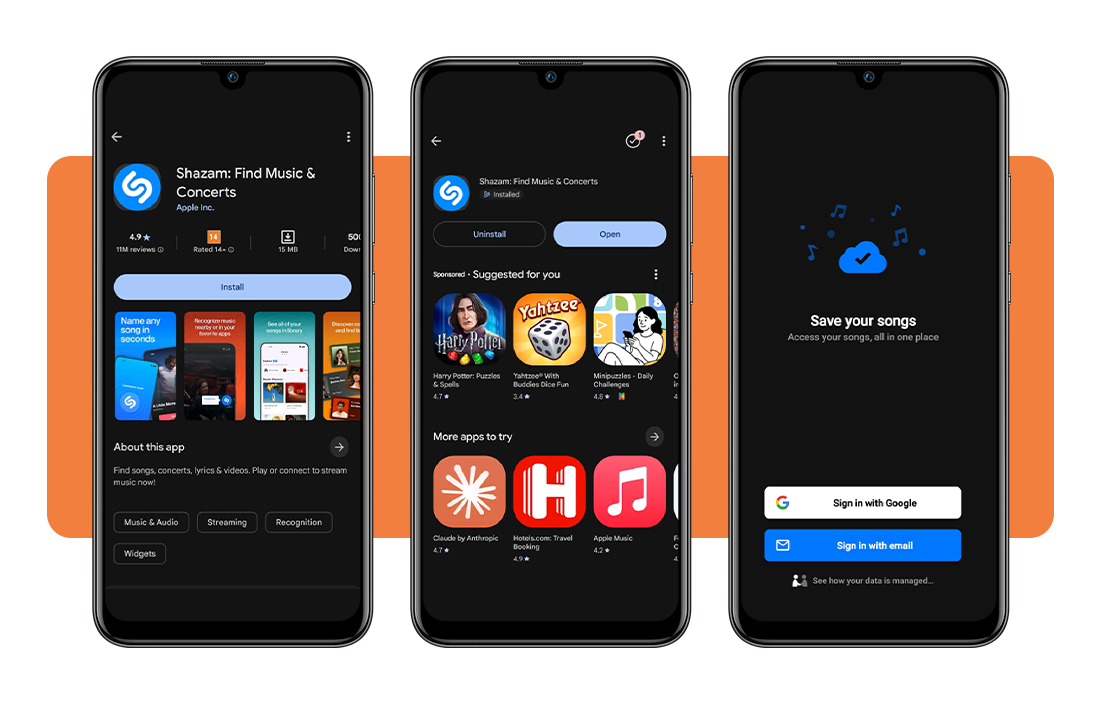
You can grab Shazam for free from the Google Play Store or the App Store, depending on which device sits in your pocket, and install it like you would any other app.
Once it’s installed, open the app and sign in using your Google account or your email address, which keeps your discovery history saved and ready whenever you need it.
Step 2: tap to Shazam a song
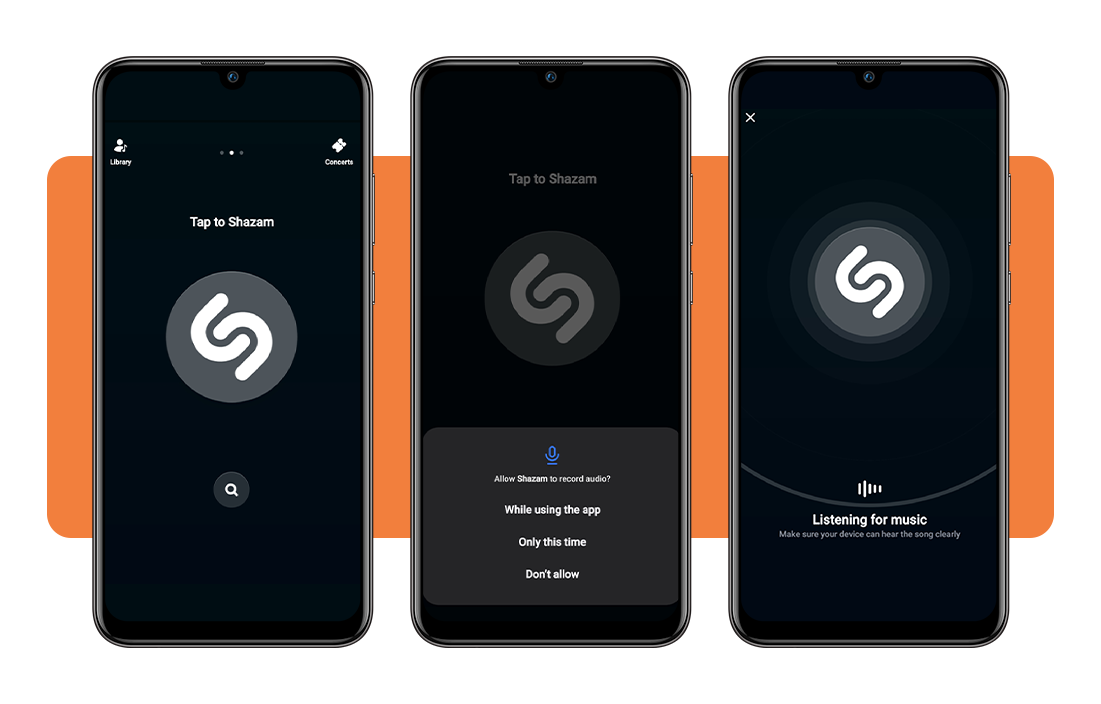
Pull up a song you already love, whether it’s playing from a speaker nearby or streaming through your own headphones, and hit the big ‘S’ button on your screen.
Give the app a few seconds to listen and process the audio, and it’ll pull up the song title along with the artist name almost immediately after that.
Step 3: check the track information page
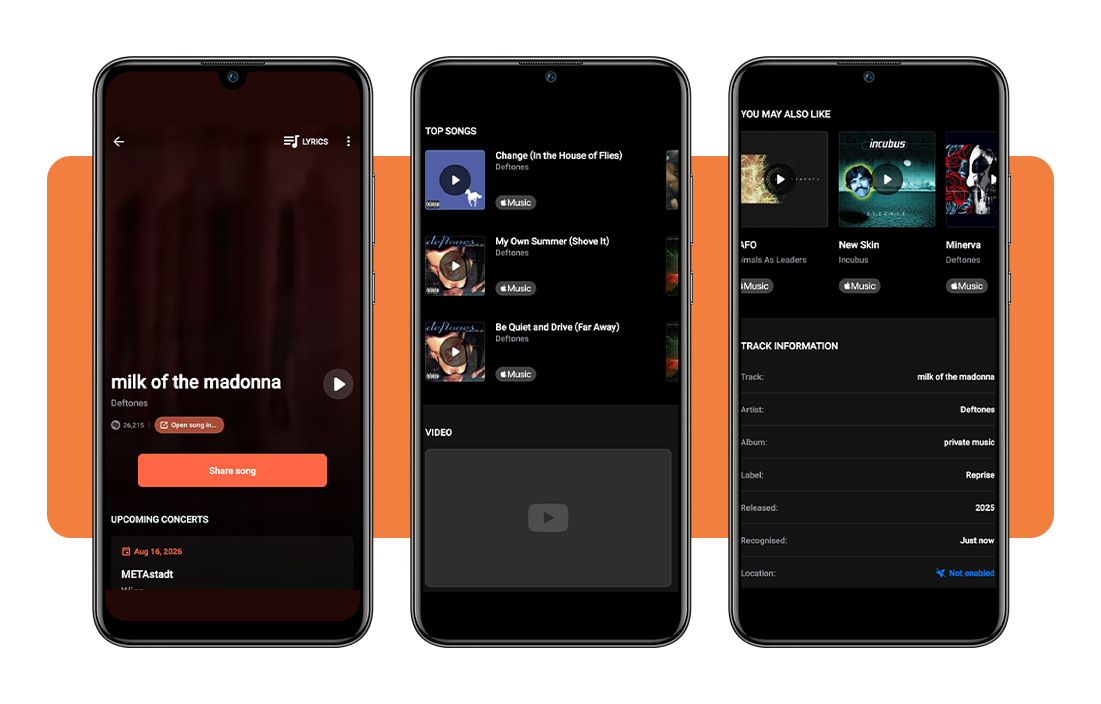
Once your song pops up on screen, scroll down past the share button and concert listings until you land on a section labeled ‘Track information,’ packed with useful details.
This similar songs app gives you the album name, record label, and release year for the song you just matched, plus a widget showing songs you may also like.
Step 4: browse similar songs instantly
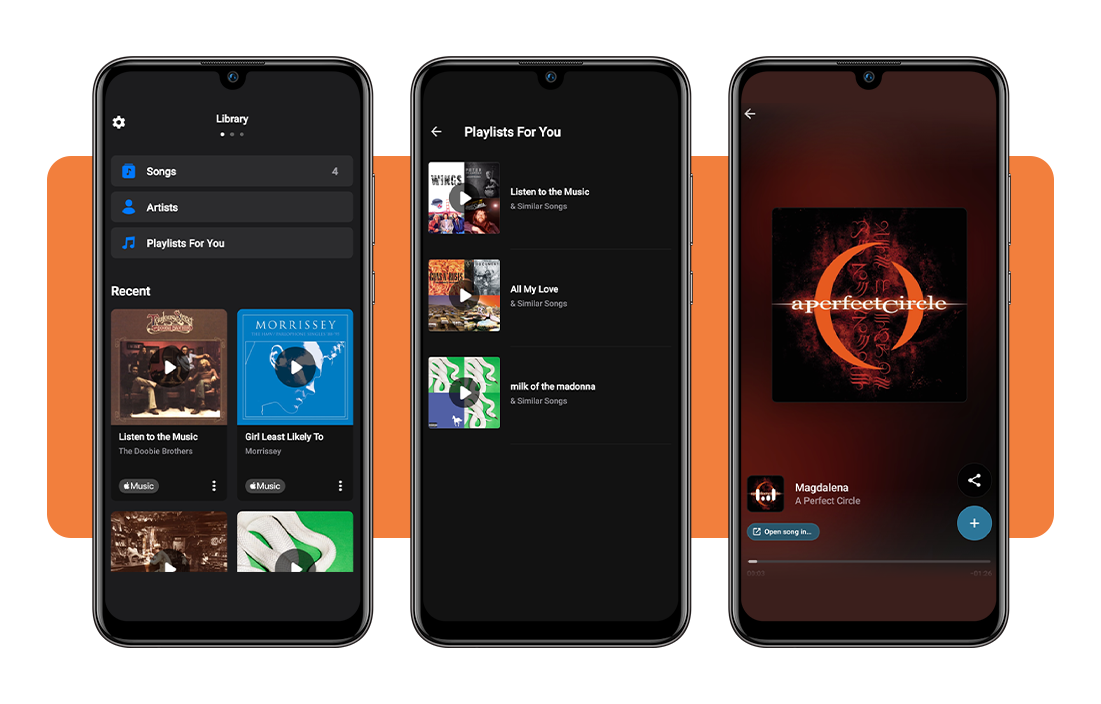
Head back over to your library and open up the playlist tied to the song you just matched, sitting right alongside every other track you’ve discovered before.
Scroll through the list of related songs and artists sitting inside that playlist, and tap on anything that catches your eye to start playing it immediately.
Compatibility and safety tips
Shazam (Android | iOS) runs smoothly across both Android and iOS devices, so you won’t run into trouble no matter which phone brand you carry around every day.
The app also pairs well with headphones, other apps, and your favorite streaming services, which means fewer interruptions and a lot less fumbling around trying to get a match.
Getting the most out of this similar songs app means knowing exactly what permissions to grant and how those settings shape the experience you get every time you open it.
Identify songs playing through your headphones
You don’t have to pull your headphones out just to get a match, since Shazam can pick up audio straight from your device’s output through ‘Share Screen’ access.
Once you grant that permission, the app catches whatever plays through your headphones and matches it just as fast as it would with a song blasting from a speaker.
Works inside TikTok, Instagram, and Snapchat
Scrolling through your social media feed and hearing a song you need to know the name of doesn’t mean leaving the app to go searching somewhere else.
This similar songs app runs through your notification bar or quick tile, catching audio from Snapchat, Instagram, or TikTok while you keep scrolling without missing a beat.
Review and manage your privacy settings
Shazam asks for microphone access to catch songs playing around you, location access to show nearby concerts, and notification access to send you personalized updates.
Head into your device settings whenever you want to double-check what’s turned on, and feel free to switch off anything that doesn’t feel necessary for how you use the app.
Connect your preferred music streaming account
Linking this similar songs app to Apple Music or Spotify means every song you match gets added straight into your existing library without you lifting a finger to search for it.
Access the app’s settings, find the connection option, and sign into whichever streaming service you already use most to keep your entire collection in one place.
Related: Enjoy High-Quality Music and Offline Listening with This App
4.9/5
One song can lead to a whole playlist
Shazam turns any song you hear into a doorway toward new artists and tracks that fit right into your taste, all starting from a single search and an easy tap.
In this Insiderbits guide, we showed you how this similar songs app helps you match songs, build playlists, and even track down concerts happening near your city.
Add Insiderbits to your favorites tab and learn more ways to make the most of every app built for music lovers like you who never want to miss out on a great new song.