Getting children excited about music isn’t always simple, especially when lessons feel like chores. Creating a fun way to learn piano at home makes a real difference.
Simply Piano changes how kids connect with music. It turns practice into play, with real songs, friendly lessons, and progress they can actually hear and enjoy.
Curious how learning music fits into busy days without stress or mess? This Insiderbits guide shows exactly how to turn your tablet into a fun and free piano teacher for kids.
Related: ABCmouse app: the ultimate learning platform for kids
Learn piano at home for kids: how it works
| Pricing: | 14-day free trial, then you must subscribe to a plan to continue. |
| Available For: | Android, iOS, and Web. |
Learning music might seem complicated, but Simply Piano makes it approachable from day one. Kids explore melodies, rhythms, and technique in a way that feels playful and personal.
The app guides every note with colorful visuals and real-time feedback. Children can follow lessons independently, or with a parent nearby, learning songs that spark real excitement.
By turning musical discovery into a daily habit, piano at home becomes something your child actually looks forward to. All it takes is a phone or tablet, and curiosity.

4.7/5
How Simply Piano turns your device into a teacher
Simply Piano listens to every note and responds in real time. Kids see what they play, learn what to adjust, and grow their skills immediately.
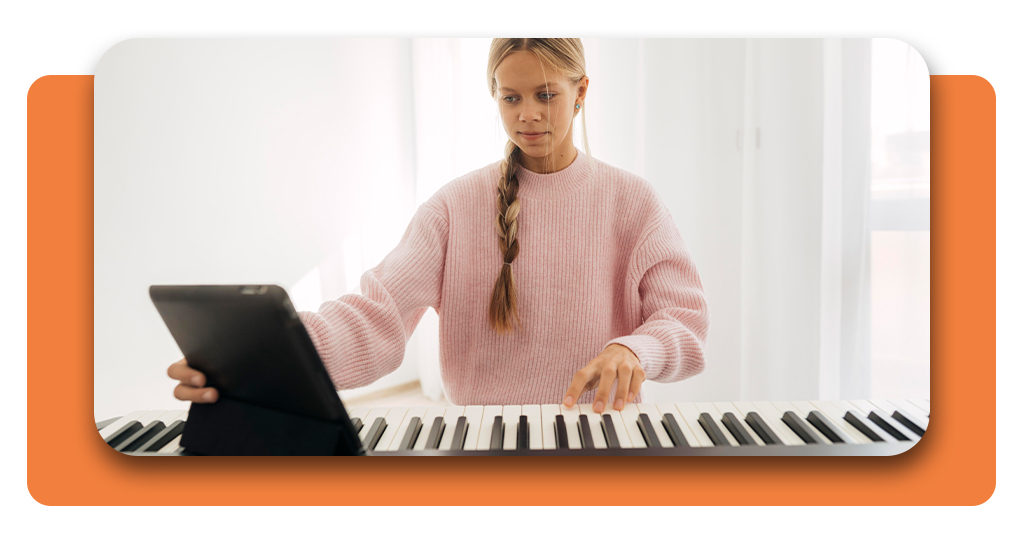
Devices become the center of learning, resting near the keyboard while lessons unfold. Visual cues and animations walk kids through each new challenge without frustration.
You’ll teach music at home with an app kids will love. No stress, no pressure, just progress kids can see and a routine they’ll enjoy repeating.
Music lessons that adapt to your child’s pace
Many piano lessons rush children through material before they’re ready. With Simply Piano, every step adjusts based on how your child interacts with the lesson.
If a section is tricky, the app repeats it gently. If they’re ready to move on, it introduces new songs or techniques without interrupting their momentum.
Learning piano at home becomes a personal journey, with each session designed to support progress without pressure. Your child leads, and the app responds accordingly.
Why kids stay engaged from day one
Children connect with songs they know. Simply Piano includes pop hits, classical themes, and familiar melodies that make practice feel like play instead of repetition.
Progress is visual and rewarding. Badges, stars, and playful animations celebrate small wins. It’s not about perfection, but about growing steadily and staying motivated every session.
You’ll notice that learning piano at home isn’t a chore. It’s an activity kids return to willingly, because the app rewards effort with fun and musical accomplishment.
Features that make learning fun and interactive
A learning experience needs more than lessons. Simply Piano adds play into every tap, creating a space where kids build skills while exploring what music can truly offer.
Colors, animations, and sounds work together to keep kids interested. Instead of feeling like a chore, lessons feel like discovery. Each note introduces a new musical moment.
It’s not about rushing. It’s about connection. Simply Piano gives children a chance to interact with music in a format that encourages them to keep playing again and again.
Song library with hits kids recognize
Children learning piano at home light up when they recognize a melody. The app includes pop songs, classical pieces, and even movie themes to make each session feel familiar and fun.
Learning becomes part of play when songs are engaging. Instead of drills, kids follow rhythms from tunes they already know, building skill while enjoying every sound they produce.
Parents looking for creative solutions will find this library refreshing. It meets kids where they are and grows with them as their interests evolve naturally.
Real-time feedback that makes practice rewarding
Every note gets an instant response. If something sounds off, the app reacts immediately, helping kids fix mistakes while keeping the learning process light and playful.
With Simply Piano, piano at home becomes dynamic. Kids don’t feel alone while practicing. The app offers guidance as they play, encouraging better technique through gentle correction.
This ongoing feedback motivates kids to keep trying because progress feels real and visible. Each session builds trust, turning small improvements into something worth celebrating.
Multiple profiles so the whole family can join
Sharing the piano doesn’t require sharing progress. Each child or family member can have their own profile with lessons tailored to their individual skill and pace.
Families using the app to practice piano at home will appreciate how it keeps everyone’s lessons separate. No confusion, just music designed around each learner’s rhythm.
It builds a connection beyond music. Parents can watch their children grow while exploring the app for themselves, too. It’s music time that feels personal and shared all at once.
Related: Real Drum App – Master the Drums on Your Smartphone
Where to download Simply Piano
Getting access to Simply Piano is easy and quick. You just need a compatible device, internet connection, and a few minutes to set everything up with your child.
The app runs on phones, tablets, Chromebooks, and browsers. This flexibility helps families fit music practice into their existing routines without needing expensive tools or extra equipment.
Once your device is ready and your child is curious, there’s nothing holding you back. Just download the free piano app and let your kids start today.
Download on Android and iOS devices
Mobile access makes everything easier. Parents looking to introduce piano at home can install the Simply Piano app on Android or iOS and start exploring musical skills together.
It works on most smartphones and tablets, giving you the flexibility to learn anywhere. Lessons are adapted to small screens without losing visual or sound quality.
The app is lightweight and regularly updated, so everything runs smoothly on modern devices. Storage needs are minimal, and you’ll be ready to play quickly.
How to download the app on Android
- Open Google Play Store and search for “Simply Piano” by Simply Ltd;
- Tap the official result and select “Install” to begin downloading;
- Wait for the installation to complete before opening the app;
- Launch the app and follow the setup to create your child’s profile.
How to download the app on iOS
- Open the App Store and search for “Simply Piano: Learn Piano Fast”;
- Tap the official version and select the download cloud icon;
- Let the download finish, then tap to open the app;
- Set up a new user profile for your child to begin learning.
4.7/5
Use Simply Piano on Chromebook or browser
Learning piano at home works well on larger screens too. Simply Piano runs smoothly on Chromebook, making lessons more comfortable with a full keyboard and extra space.
You can also use the app through a browser. Just visit the official site, sign in with your account, and your child’s lessons are ready to begin.
This flexibility helps families choose what fits best. Whether it’s a shared laptop or school Chromebook, Simply Piano keeps music learning accessible without needing extra downloads.
What to know before subscribing to Premium
Simply Piano offers a 14-day free trial that lets your child explore lessons, songs, and tools before you commit. It’s a useful way to see how the app fits.
Premium access unlocks more than just content. It adds advanced lessons, practice goals, and extra support to keep kids progressing with structure and motivation each day.
If you’re building a consistent piano at home routine, Premium features help maintain structure. Start with the trial, then decide based on your family’s experience and interest.
Step-by-step: first lessons on the app
The first time your child opens Simply Piano, they’ll be greeted with music, colors, and a quick setup that invites them to play instead of hesitating.
Each step is designed with young learners in mind. There’s no pressure to get it perfect. Instead, they’re encouraged to explore, listen, and build comfort gradually.
With each small achievement, your child builds rhythm, coordination, and focus. These early lessons aren’t just fun. They help lay the foundation for future musical progress.
Step 1: create your child’s learning profile
Profiles make it easy to track progress, pick songs, and tailor lessons. It’s where the piano at home experience truly becomes personal and focused on growth.
Creating a profile only takes a few moments. Your child picks an avatar, enters their name, and chooses how much experience they already have with piano.
Once set up, the app begins guiding them into their first lesson. Progress is saved automatically, so they can return whenever they’re ready to play again.
Step 2: position your device near the keyboard
Set the tablet above the keys so your child can follow the screen without losing hand position or interrupting the flow of their lesson.
Creating a consistent piano at home routine starts with setup. When your device is steady and the screen is easy to view, learning becomes less distracting and more focused.
With clear audio input and good visibility, the app responds accurately to every note. That connection helps build trust in the process right from the start.
Step 3: begin the first note-reading activity
The first activity introduces note reading using bright visuals and gentle pacing, helping kids connect symbols with sounds before playing full melodies on the keyboard.
Notes appear one by one as your child plays, and the app reacts instantly, showing which keys match and which need adjustment during early practice moments.
As skills grow, reading music during piano at home sessions feels familiar, helping children recognize patterns, timing, and hand placement naturally through repetition and feedback.
Related: Beginner Guitar Lessons: Master the Basics with Apps
Bringing music to life at home
Simply Piano makes music feel natural for kids. With every lesson, they build skills while staying engaged through familiar songs, playful visuals, and hands-on interaction daily.
This Insiderbits guide explains ways parents can support learning and practicing piano at home using tools that respect routines, attention spans, and family time together comfortably.
Explore Insiderbits for more articles about learning apps for kids, covering music, reading, creativity, and skills that support growth across different ages and stages.